


Learn what Google Search Console is, how it differs from Google Analytics, and how to use Performance, indexing, sitemaps, URL Inspection, links, enhancements, and Core Web Vitals.
Google Search Console is a free service that helps website owners, developers, and SEO professionals understand how a site performs in Google Search. It shows which queries and pages receive impressions and clicks, whether important URLs are indexed, how Google encounters the site, and whether specific search features or technical issues need attention.
Search Console does not optimize a website automatically and it does not report every visit from every channel. Its value comes from turning Google Search data into practical decisions about content, indexing, user experience, and technical SEO.
What is Google Search Console?
Google Search Console, often shortened to GSC, is the primary Google interface for monitoring a verified website’s presence in Search. After proving ownership or receiving access, you can review reports, inspect URLs, submit sitemaps, and receive messages about significant issues.
Two common property types are available. A Domain property combines protocols and subdomains but requires DNS verification. A URL-prefix property covers only the exact prefix entered, such as https://www.example.com/, and supports several verification methods. Choose the property type that matches how your organization manages the site.
Why Google Search Console matters
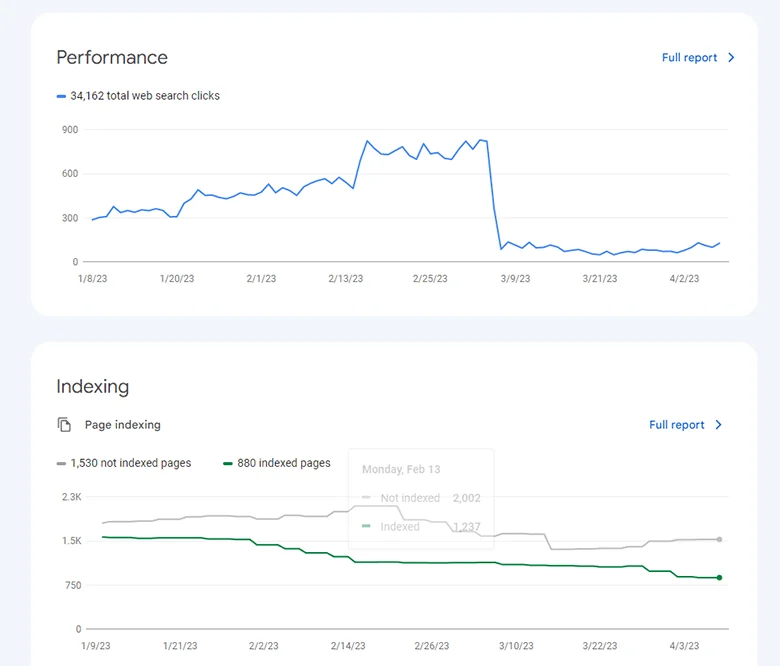
Without Search Console, a traffic change can be difficult to diagnose. GSC lets you separate changes in impressions, clicks, CTR, average position, device, country, page, and query. It also reveals indexing reasons, crawl or serving problems, manual actions, security issues, and structured-data enhancements.
The tool is especially valuable after publishing important content, changing templates, moving domains, redesigning navigation, or experiencing an unexpected search decline. It provides evidence, but interpretation still requires context: seasonality, demand, competitors, migrations, and measurement changes can all affect results.

Drive search-focused visits to your landing pages, then compare Search Console visibility with on-site engagement.
Key Google Search Console reports and tools
Performance report
The Search results Performance report shows total clicks, impressions, average CTR, and average position. You can group or filter data by query, page, country, device, date, search appearance, and search type. Separate Performance reports may be available for Discover, Google News, and other eligible surfaces.
Use the Queries tab to understand the language people use and the Pages tab to identify strong or declining landing pages. High-impression, low-CTR queries may reveal an opportunity to improve the title, description, opening answer, or intent match. Focus on trends in impressions and clicks rather than treating average position as an exact rank.
Insights report
Search Console’s Insights report offers a simplified view of important content and query trends. Availability can vary because features may be introduced gradually. Use it for quick orientation, then open Performance when you need detailed filters, comparisons, and page-level analysis.
Page indexing report
The Page indexing report shows which known URLs are indexed and why other URLs are not. More non-indexed pages than indexed pages is not automatically a problem: redirects, duplicates, parameter URLs, and intentionally excluded pages may be correct. Investigate canonical pages that should appear in search but are blocked, unavailable, duplicated incorrectly, or marked noindex.
URL Inspection
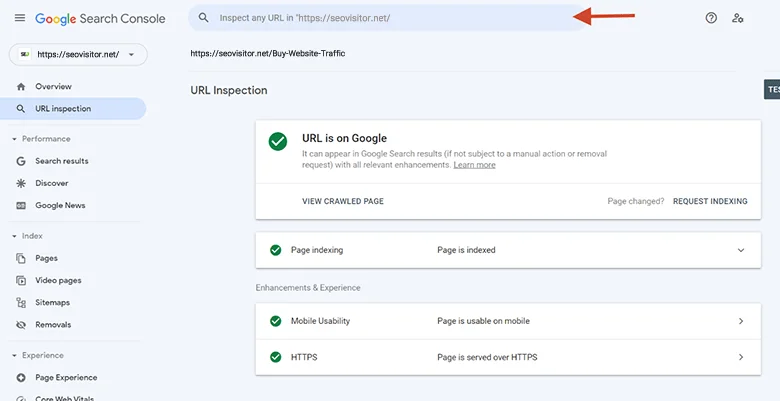
URL Inspection reports Google’s indexed version of a URL and lets you test the live page. You can review crawl access, indexing eligibility, the selected canonical, and detected enhancements. After a meaningful fix or a new important page, you can request indexing. A request does not guarantee inclusion or an immediate crawl.
Sitemaps
Submit an XML sitemap that contains clean, canonical, indexable URLs. The sitemap helps Google discover and process pages; it is not a ranking shortcut. Review the submitted and discovered counts, correct fetch or parsing errors, and remove redirected, duplicate, blocked, or noindex URLs from the file.
Core Web Vitals
This report groups URLs using field data for loading, responsiveness, and visual stability. Investigate affected templates, test representative pages, fix shared causes, and validate the improvement. Core Web Vitals support a better experience but do not replace relevant, trustworthy content.
Links report
The Links report summarizes external links, internal links, linking sites, and common linking text known to Google. It is useful for finding important pages with little internal support, but it is not a complete backlink database. Evaluate links by relevance and editorial context rather than raw totals.
Enhancements and rich-result reports
When Google detects supported structured data or specific search features, Search Console may show enhancement reports. Fix invalid items, review warnings, and ensure markup accurately represents visible content. Valid structured data makes a page eligible for certain appearances; it does not guarantee that Google will display them.
Manual actions and security issues
Check these reports when visibility drops unexpectedly or Search Console sends an alert. A manual action means a human reviewer found a violation of Google’s spam policies. Security issues can include hacked content, malware, or harmful downloads. Resolve the underlying cause thoroughly before requesting a review.
How to use Search Console for SEO
Find pages with existing opportunity
Filter Performance by page, compare equivalent periods, and review the associated queries. Pages with relevant impressions and positions near the first page may benefit from clearer answers, updated evidence, stronger internal links, or a better snippet.
Diagnose a traffic decline
Determine whether impressions, clicks, CTR, or average position changed and whether the decline affects the whole site, one directory, one device, one country, or a few pages. Compare dates, check indexing and manual-action reports, review recent deployments, and consider seasonality or changes in search demand.
Improve internal discovery
Combine the Links report with your own crawl or content inventory. Add contextual links to important pages from relevant hubs and established articles, repair broken paths, and remove orphan pages. Descriptive anchor text helps users and search engines understand the destination.
Evaluate content updates
Record the date and scope of each major change. Compare similar time ranges and monitor impressions, clicks, CTR, and conversions together. One page may gain broader visibility while average CTR falls; another may hold rankings but attract fewer searches because demand changed.
Google Search Console vs. Google Analytics
Search Console explains how a verified property appears and performs in Google Search before and through the click. Google Analytics 4 measures activity on tagged websites and apps after users arrive, including acquisition channels, pages, events, engagement, and conversions or key events.
The tools use different data, definitions, processing rules, attribution, privacy protections, and time zones, so totals will not match exactly. Use Search Console for query and indexing questions, and analytics for onsite behavior and business outcomes.
What Search Console cannot do
- It cannot guarantee indexing or rankings.
- It does not show all website traffic from every channel.
- It does not provide a competitor’s private query and click data.
- It does not replace analytics, a crawler, speed testing, or user research.
- It does not prove that one change caused a performance increase.
Some queries are anonymized for privacy, and report tables can omit lower-volume rows. Treat GSC as an authoritative view of Google Search performance for the verified property, not as a complete record of every search or user.
A weekly Search Console checklist
Review important performance changes, compare top pages and queries, inspect unexpected indexing movements, check sitemap status, and read new messages. Monthly, evaluate non-branded visibility, high-impression pages with weak CTR, device and country differences, internal-link gaps, and the impact of completed improvements.
Final takeaway
Google Search Console is essential because it connects search visibility with technical evidence. Use it to understand demand, diagnose indexing, improve important pages, and measure changes—while relying on analytics and business data to confirm whether those clicks create value.
Frequently Asked Questions
Quick answers to common questions about Google Search Console
Google Search Console helps site owners understand how their pages perform in Google Search. It reports clicks, impressions, CTR, average position, indexing status, sitemaps, Core Web Vitals, links, enhancements, manual actions, and security issues.
Yes. Google provides Search Console without a subscription fee. You must verify control of a website property before viewing its data and managing settings such as users or sitemap submissions.
No. Search Console reports activity from Google Search and separate Google surfaces such as Discover or News when eligible. Use an analytics platform to measure visits from all channels and what users do after arriving.
No. Search Console provides private data only for properties you can verify. It does not show a competitor’s complete queries, clicks, or indexing reports. Competitor research requires public search results and suitable third-party tools.
No. URL Inspection can request crawling of an eligible page, but it does not guarantee indexing or ranking. Google decides whether and when to crawl, index, and display a page based on its systems and the page’s quality and accessibility.

Comments
Leave a Comment