

Great job! I was happy using Seovisitor on a few pages, and the results were noticeable. The traffic looked natural and helped improve engagement.

Daniel BrooksSEO Consultant
Increase website traffic from favorite websites!
Increase referral traffic with campaigns built around your selected referrer sources and destination pages. Choose a Quick Order package for a simple setup, or use Advanced settings to customize daily visits, countries, devices, visit duration, and internal pageviews.
Track campaign progress in your Seovisitor dashboard and monitor recorded sessions in Google Analytics and Microsoft Clarity.
 Start Your Traffic Campaign
Sign up with Google and receive a $1 account bonus plus 500 Club Points.
Starting at just $0.08 per 100 visits





Choose a predefined Quick Order package for a faster setup, or use Advanced to customize the available traffic, targeting, session, device, and scheduling options for your campaign.
By selecting one of these plans, you can benefit from the following features:
Unlock these benefits by choosing the advanced options:
Build campaigns around your chosen sources and destination pages
Seovisitor helps you Buy referral traffic to the pages you choose, with source settings that keep each campaign focused and organized. Set up visits for a service page, product page, or article, and define a campaign that fits your traffic goals.
Start with a predefined package or customize your campaign in Advanced mode. You can plan activity around a specific timeframe and adjust the available settings to suit the destination page, rather than using the same configuration for every campaign.

Referral traffic generally refers to visits that reach your website through links on other websites, such as blogs, directories, forums, and news publications. The referring domain helps identify the source of those visits in your acquisition reports.
In GA4, referral traffic is a reporting category with specific classification rules. Search engines and recognized social platforms usually belong to separate channels, so an external visit is not automatically classified as Referral.
When buying this service, distinguish the selected referrer setting from a published placement. Choosing a domain does not, by itself, create a backlink or advertisement on that website or establish that its existing audience is being reached.
Sign in to Seovisitor, select Referral Traffic, and choose Quick Order or Advanced setup. Enter your destination URL and configure the referrer options available for the selected campaign.
Check the included settings, campaign volume, and displayed cost before placing your order. For an Advanced campaign, also confirm your country, device, visit duration, internal pageviews, and scheduling settings.
A planned referral traffic campaign gives you a clear way to allocate visits to the pages that matter to your business. Focus on a service page, product, or article, and define what you want to measure before the campaign begins.
Set daily volume and campaign duration to coordinate visits with content updates, product launches, or seasonal activity. Organize campaigns by destination and configuration so you can compare their recorded results and make informed adjustments to your traffic budget.
A defined campaign scope also makes spending easier to evaluate. Assign a purpose and budget to each destination, then use the results to decide which campaigns to continue, adjust, or stop.
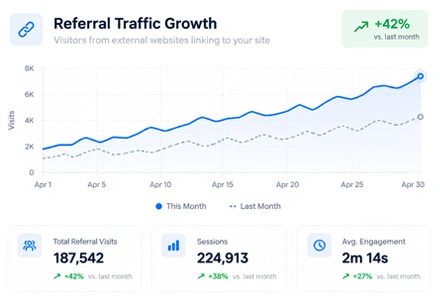
Referral traffic and organic search measure different parts of website acquisition. A referral campaign can add visits to selected pages, but higher session counts or longer visits do not, by themselves, demonstrate improved search rankings.
Referral visits are also different from earned backlinks. A source appearing in an analytics report does not establish that the referring website has endorsed your content or passed link equity. Buying referral traffic does not guarantee indexing, keyword growth, or sales.
Evaluate campaign activity in GA4 and search performance in Google Search Console. Compare search clicks, impressions, and positions alongside content updates and technical changes, while keeping purchased campaign activity separate from organic growth.
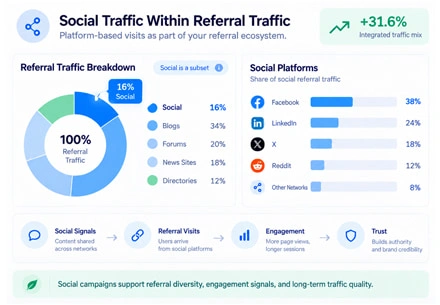
Choose a traffic service according to the visit path you need. Referrer settings, social platform sources, and existing backlink URLs serve different campaign requirements, even when they all involve visits from outside your website.
For website visits associated with platforms such as Instagram, Facebook, LinkedIn, X, or Telegram, explore Social Traffic. This service focuses on website traffic, rather than followers, likes, or comments on social posts.
If your campaign involves an existing external link, explore Backlink Traffic and its link requirements. Confirm the supported visit method before ordering when traffic through a particular published page is essential.
To test AI-source attribution alongside other website referrers, explore AI referral traffic. The service uses automated visits carrying selected AI referrers to help you check source and landing-page reporting.
Choose the source and visit settings that fit your campaign, with additional controls available in Advanced mode.
Choose your destination URL and the referrer options available in your campaign setup. For campaigns with different sources or landing pages, use descriptive names that make each configuration easy to identify.
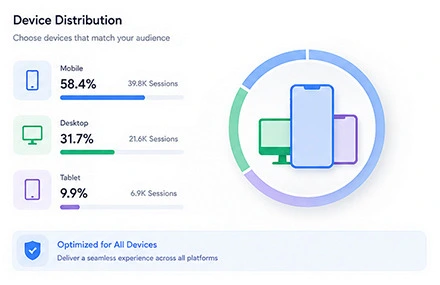
Select mobile or desktop traffic using your website’s existing device data and the experience you want to evaluate. Device targeting controls the browsing category; it does not establish a visitor’s interests or profession based on the selected referrer.
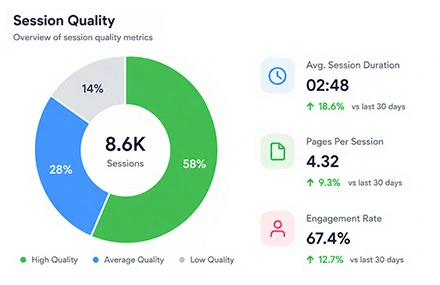
Visit duration defines the time configured for a visit, while internal pageviews extend activity beyond the landing page. Use a browsing path that connects relevant pages, such as a service overview followed by its features or pricing.
A visit can include several pageviews, and configured duration may differ from the engagement time recorded by analytics tools. GA4 calculates bounce rate from sessions that do not meet its engagement criteria, so assess the recorded result alongside pageviews and engagement rate.
Set a daily visit volume that fits your budget, campaign timeframe, and website capacity. When comparing different configurations, change one setting at a time so you can understand which adjustment affected the recorded results.
Check whether the displayed allowance is measured in visits or pageviews, including any bonus. For Advanced orders, distinguish the daily cost estimate from the amount needed for the full campaign period.
Delivering real visitors from selected GEOs and regions
Explore our dedicated pages for popular GEO-targeted traffic locations:
View traffic by countryTrusted by 20,000+ users, processing over 400,000 orders
Real experiences from marketers, creators and website owners using Seovisitor.
Great job! I was happy using Seovisitor on a few pages, and the results were noticeable. The traffic looked natural and helped improve engagement.
I didn’t expect much at first, but after a few days I noticed better time on page. I mainly use it when launching new content.

I tried Seovisitor on a side project. The traffic increase was subtle but noticeable, and it gave me useful insights for testing new content layouts.

Seovisitor works well for older articles that have stopped getting attention, helping bring them back into circulation.

I’ve used the system several times and noticed an immediate change in my website stats.

This system was used for several blog posts and helped turn one article into one of the most visited. That was amazing.

I don’t run it all the time, only for specific campaigns. For controlled testing, it does the job well.
I applied Seovisitor to a few product pages. It helped me observe user patterns and refine my marketing strategy.
Using Seovisitor for my tech blog posts gave me a better sense of which topics readers engage with most. Very insightful.

Monitor incoming visits and view real-time campaign updates from your Seovisitor dashboard.

Follow campaign progress in your Seovisitor dashboard, then compare recorded activity in GA4 using the same dates and destination pages. In the Traffic acquisition report, select Session source / medium to examine referrer domains, sessions, engagement rate, and key events.
Use landing-page reports to assess individual destinations and Microsoft Clarity to inspect available session recordings. Source / medium and channel grouping are different dimensions, so visits associated with social platforms may appear under a social channel rather than Referral.
Start with a small campaign to verify your destination URL, redirects, and analytics tags. Investigate unexpected sources or Direct traffic before increasing daily visits. Counts can differ between Seovisitor, GA4, and Clarity because of collection methods, consent settings, and reporting delays.
Connect each campaign to a specific page and a clear question you want to answer.
For a service page, define a route from the overview to pricing or contact information. For a product page, focus on access to specifications, shipping details, or related products. These examples give the campaign a concrete purpose beyond adding visits to a URL.
Use the resulting activity to inspect that route: can the next page be reached, does an overlay interrupt navigation, or does an important element fail to load? Keep any genuine inquiries or purchases separate from configured page activity when assessing business results.
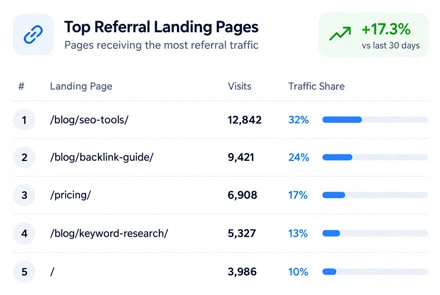
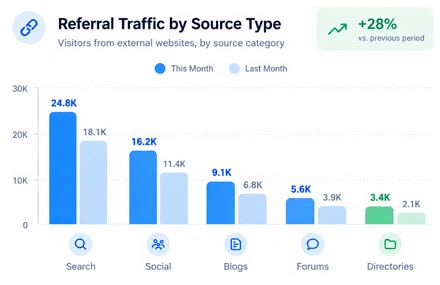
For a guide or educational article, choose a relevant continuation, such as a supporting tutorial or a related service page. This creates a specific content path to examine instead of sending every visit back to the homepage.
Look for broken links, unexpected redirects, or navigation that makes the next resource difficult to reach. When internal pageviews are configured, use them to assess the selected route rather than treating them as evidence that readers independently preferred that topic.
Compare the outcome with the question you set at the start. If the campaign reveals a page or navigation problem, fix it before allocating more budget. If the objective was to verify a particular browsing route, assess whether that route worked as intended rather than judging success by total visits alone.
Record the destination, settings, cost, and findings for each campaign. Continue or adjust the setup when it serves a defined purpose; increasing volume is not automatically the right next step.
Create the best possible purchase referral traffic campaign and get the best feedback.
Confirm that your analytics tags are active on the landing page and any internal pages included in the campaign. Check that important events are recorded correctly before placing your order.
Make sure your server can support the planned visits alongside existing traffic. Resolve slow responses, access restrictions, or downtime that could interrupt the campaign.
Compress large images, remove unnecessary scripts, and test the selected device layout. Check forms, navigation, and internal links so the intended browsing path works correctly.
Answers about campaign options, pricing, tracking, and expected results.
Choose Quick Order when its predefined settings match your needs. Use Advanced when you need to customize daily visits, campaign duration, country, device category, visit duration, internal pageviews, or scheduling.
Yes. Use the full URL of the service page, product page, article, or other destination you want to receive visits. Make sure the page is publicly accessible and that tracking is active on that URL.
Selecting a referrer is a campaign setting, not a link publication order. Do not treat a recorded source as proof of an advertisement, editorial placement, or endorsement from that website.
Quick Order pricing depends on the selected package. The Advanced calculator estimates daily cost from visit volume and the configured time on the landing page and additional pages. Check the displayed estimate and campaign period before ordering.
No. One visit can include several pageviews, and a returning visitor can make more than one visit. Use the unit stated in your package or order details when comparing the purchased allowance with recorded activity.
Direct traffic can appear when usable source information is unavailable. Inspect redirects, referrer handling, and analytics settings, and check that you are using session-level acquisition dimensions for the campaign period.
Referral visits are not Google Search clicks and do not appear as such in Search Console’s Search results report. Use GA4 and your Seovisitor dashboard to examine referral campaign activity.
Configured visits are not an unbiased sample of potential customers. Use campaign records to evaluate the selected setup, and use representative audience research, qualified leads, and sales data to assess demand.
No. Search visibility depends on broader SEO factors, while sales depend on audience relevance, your offer, and the website experience. An increase in campaign visits is not a guarantee of either outcome.
Check your report dates, tracking tags, and destination URL first. If the issue remains, contact Seovisitor support with the campaign ID and relevant reports. Any refund request is assessed under the applicable refund policy.
Practical guides, fresh ideas and proven strategies to help you grow smarter.
 All About Site Traffic
Select an old post using relevant Search Console queries, decide whether to keep or refresh it, audit its answer, add original value, and measure the result without assuming AI Overview inclusion.
 All About Site Traffic
Calculate whether a USA-targeted website traffic campaign covers its full acquisition cost. Compare ROI with ROAS, follow a hypothetical margin and break-even example, and use verified outcomes to decide whether to stop, revise or continue.
 All About Site Traffic
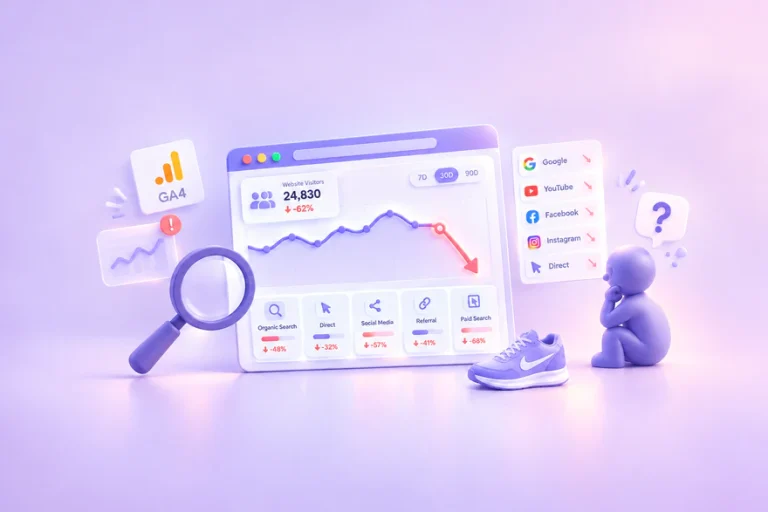
Investigate a sudden drop in website traffic before changing your site. Use a channel-by-channel process, practical worksheets and a hypothetical example to separate reporting changes from real losses.