

 North America
United States
North America
United States
Buy USA Website Traffic
Reach visitors in the United States with a country-targeted traffic campaign.
View country detailsChoose targeted website traffic from the country that matches your audience
Explore dedicated GEO pages, compare regional options and create a measurable traffic campaign for your website from one straightforward dashboard.













 Start Your Traffic Campaign
Sign up with Google and receive a $1 account bonus plus 500 Club Points.
Starting at just $0.08 per 100 visits






Open a country page for targeting details, campaign guidance and the available setup for that region.
North America
United States
Reach visitors in the United States with a country-targeted traffic campaign.
View country details
Europe
United Kingdom
Build a focused campaign for websites serving audiences across the United Kingdom.
View country details
Europe
Germany
Send geo-targeted visits from Germany to your website on a controlled schedule.
View country details
Europe
France
Choose France as your campaign region and monitor delivery from your dashboard.
View country details
South Asia
India
Plan website traffic campaigns for one of the world's largest online audiences.
View country details
South America
Brazil
Target website visits from Brazil for Portuguese-language and regional campaigns.
View country details
Europe & Asia
Turkey
Create a dedicated traffic campaign for audiences and websites focused on Turkey.
View country details
Southeast Asia
Vietnam
Direct your campaign toward visitors in Vietnam and follow its delivery metrics.
View country details
Southeast Asia
Indonesia
Reach an Indonesian audience with flexible volume, timing and campaign controls.
View country details
Eurasia
Russia
Review the dedicated setup for traffic campaigns targeted to visitors in Russia.
View country detailsLooking for another location? These are the countries with dedicated service pages. You can review the broader list of currently available regions while creating a campaign in the user panel.
View available regionsOne directory, clear country choices and a consistent campaign workflow.
Geo targeting is useful when a website serves a defined market, uses a regional language or needs country-level traffic data. Start with the country closest to your audience instead of mixing unrelated locations in the same test.
Each page in this directory explains its region in more detail. The underlying campaign controls remain familiar, so you can choose volume and timing, then monitor delivery from the Seovisitor dashboard and your analytics tools.
Learn about website traffic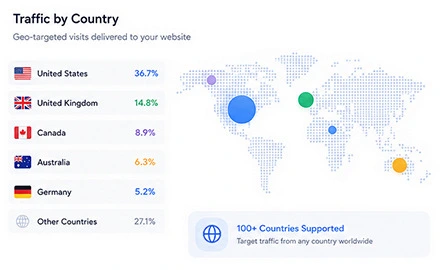
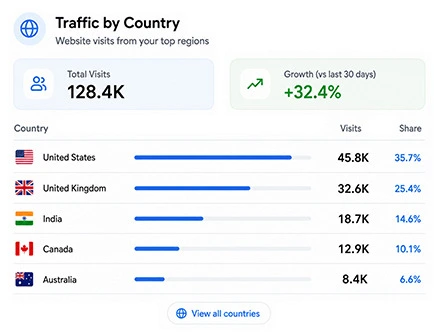
Select a country that matches your actual customer base, landing-page language and service area. Strong alignment between the target market and your website makes campaign data easier to interpret and prevents unrelated locations from affecting your analysis.
If your website serves multiple markets, start with one country at a time and use data from Google Analytics or Microsoft Clarity to decide where to expand next.
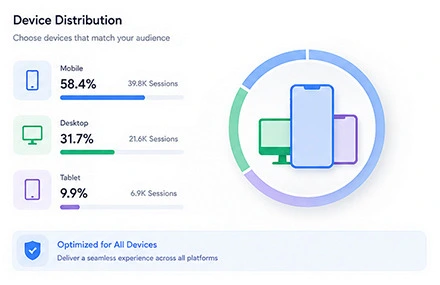
When creating a website traffic campaign, you can select whether visits come from mobile or desktop devices. This setting allows you to match the campaign with your website’s actual audience, responsive design and primary conversion path.
Review the device data available in Google Analytics or Microsoft Clarity before making your selection. If most users browse from smartphones, mobile traffic may be more relevant; if your website is primarily used on computers, desktop traffic can provide more useful campaign data.
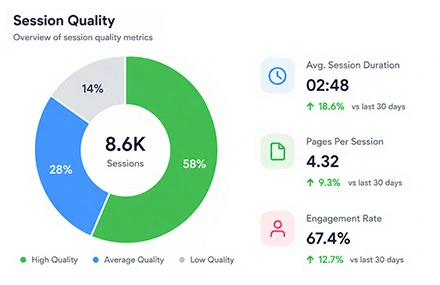
Traffic quality is not determined by visit volume alone. A useful campaign should also consider how long visitors remain on the website, whether they continue beyond the landing page and how their sessions appear in web analytics reports.
When creating your campaign, you can customize session duration, set the preferred bounce rate and enable internal pageviews. These controls allow you to align incoming traffic with your website structure, campaign objectives and existing behavioral data rather than using the same visit pattern for every project.
For higher-quality sessions, configure visits to open one to three internal pages after the landing page and set the session duration between three and five minutes. This allows visitors to move through related content instead of ending sessions after a short, single-page visit.
Select a device category—mobile or desktop—based on your audience, landing-page design and analytics data. Keep bounce rate close to your website’s normal range, then use Google Analytics or Microsoft Clarity to track behavior and refine settings for future campaigns.
From creating your account to tracking every visit, the whole workflow stays clear and manageable.
A few practical answers before you select a region and launch a campaign.
Country-targeted traffic lets you choose a geographic region for a campaign instead of receiving visits without a location preference. Select the dedicated page above to review the setup for that market.
Choose the country that best matches your website language, customer market or reporting goal. If your audience spans several markets, create and compare separate campaigns so the results remain easier to understand.
Yes. When creating a campaign, you can select the target country and choose mobile or desktop traffic based on your audience and landing-page experience. Matching the device category with your existing analytics data also makes campaign results easier to evaluate.
You can customize the total session duration, preferred bounce rate and number of internal pageviews. Configuring visits to open one to three internal pages over three to five minutes can create a more natural browsing pattern, although the final settings should match your website content and usual user behavior.
Yes. With the appropriate tracking codes installed, you can monitor campaign activity through Google Analytics and Microsoft Clarity. These tools help you analyze sessions, device categories, engagement and internal pageviews from the selected region.
Separate campaigns make website traffic by country easier to measure and compare. If your website serves multiple markets, creating an individual campaign for each country prevents unrelated regional data from being combined in the same report.
Yes. This directory highlights countries with dedicated landing pages. The complete list of regions currently available for campaign targeting is shown inside the Seovisitor dashboard when you create a campaign.
No traffic campaign can guarantee search rankings, leads or sales. Use country targeting to support visibility testing, analytics and regional campaign goals, then evaluate it alongside content quality, technical SEO and conversion performance.
Practical guides, fresh ideas and proven strategies to help you grow smarter.
 All About Site Traffic
Decide whether a USA-targeted traffic campaign pays for itself. Calculate ROI from contribution margin and full cost, review a hypothetical test, and set stop-or-continue rules.
 All About Site Traffic
Understand how AI Overviews can change search presentation and clicks, then compare relevant Query × Page data with the current Generative AI visibility reports without assuming causation.
 Digital Marketing Learning
Plan a shareable campaign around audience value, small tests, a useful landing page, and separate measurement of paid reach, earned referrals, and conversions.