

Great job! I was happy using Seovisitor on a few pages, and the results were noticeable. The traffic looked natural and helped improve engagement.

Daniel BrooksSEO Consultant
Track Google rankings daily. See what changed and who moved ahead.
Monitor up to 10 keywords per project and compare your positions with up to 3 competitors. Seovisitor brings daily ranking updates, historical charts, and mobile and desktop tracking into one dashboard.
Choose your target location, follow the search terms that matter to your business, and use ranking trends to prioritize your next SEO task.

Sign up with Google and receive a $1 bonus plus 500 Club Points.
Starting at $0.02 per rank check


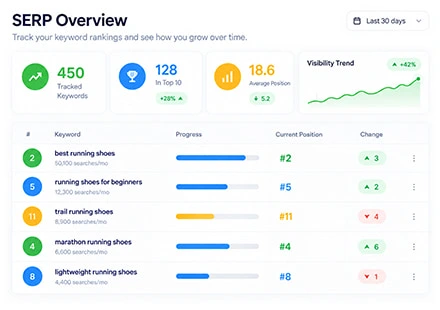
A clear record of where your website appears for your selected keywords.
A Keyword Rank Tracker checks your website’s position for the search terms you choose and records the results over time. Seovisitor performs daily checks, helping you follow progress without repeating the same manual searches.
A keyword rank checker is useful for a single snapshot. Ongoing tracking adds the timeline: whether a keyword is gaining ground, holding its position, or declining across several checks.
With features like SEO Rank Tracking and Keyword Position Checker, you can easily Track Keyword Rankings over time and see how your SEO efforts impact your visibility. Whether you’re targeting local or global audiences, this tool gives you a clear, organized view of your performance—helping you stay informed without wasting time on manual checks.
At Seovisitor, we’ve made professional Keyword Rank Tracking accessible to everyone—without the high costs of complex SEO tools. Our platform delivers accurate SERP Tracking and reliable SEO Rank Tracking in a simple, easy-to-use interface designed for real results. Whether you’re just starting out or managing multiple projects, you can confidently track your keyword performance with precision—at a price that fits your budget.
Start Tracking Your KeywordsMonitor the search market your customers use, with location settings matched to your project.
A website can hold different positions for the same keyword in different locations. Select the target country or another supported location in Seovisitor to keep your tracking relevant to the market you want to reach.
For a local business, use the most relevant location available in the project settings. For an international website, keep results from different markets separate so a change in one country is not mistaken for a change across your entire audience.
Keyword Tracking by countryTrusted by 20,000+ users, processing over 400,000 orders
Real experiences from marketers, creators and website owners using Seovisitor.
Great job! I was happy using Seovisitor on a few pages, and the results were noticeable. The traffic looked natural and helped improve engagement.
I didn’t expect much at first, but after a few days I noticed better time on page. I mainly use it when launching new content.

I tried Seovisitor on a side project. The traffic increase was subtle but noticeable, and it gave me useful insights for testing new content layouts.

Seovisitor works well for older articles that have stopped getting attention, helping bring them back into circulation.

I’ve used the system several times and noticed an immediate change in my website stats.

This system was used for several blog posts and helped turn one article into one of the most visited. That was amazing.

I don’t run it all the time, only for specific campaigns. For controlled testing, it does the job well.
I applied Seovisitor to a few product pages. It helped me observe user patterns and refine my marketing strategy.
Using Seovisitor for my tech blog posts gave me a better sense of which topics readers engage with most. Very insightful.

Track up to 10 keywords per project and compare your Google rankings with up to 3 competitor websites. Daily updates and historical charts help you follow changes across your selected search terms.
To check pricing, open the keyword rank tracker in your Seovisitor account and configure your project. Confirm the tracking options and total cost shown in the panel before submitting.
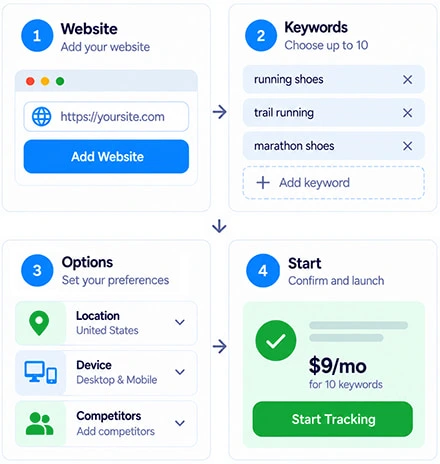
Check Pricing & Start TrackingCreate a project around your website, target keywords, and search market. These settings give your daily results a clear context.
Enter the domain you want to monitor and check that it matches the website you are working on.
Add the exact search phrases you want to follow, focusing on the products, services, or content most relevant to your goals.
Choose the available location and device settings, then add up to 3 competitor domains for comparison.
Check the configuration before submitting. Follow the recorded positions as daily checks build your ranking history.
With 10 keywords available per project, begin with terms connected to important business goals. A service provider might track its main service, location-specific variations, and a few detailed queries that closely match what customers need.
For a content website, select queries tied to articles you are actively improving. You can use Search Console query data alongside your content plan to choose relevant terms, then track those exact phrases consistently instead of replacing them after every small movement.
Keep a simple record of the page you expect to rank for each keyword. This helps you connect position changes with the right content when investigating results, even if the keyword could match more than one page on your website.
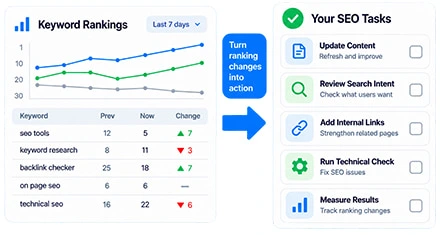
Start with the pattern rather than a single number. If a keyword declines across several daily checks, compare the movement with recent content edits, technical changes, and the search results currently appearing for that query.
Give priority to relevant keywords where a useful page is close to stronger visibility. Check whether the page answers the search intent, covers the topic clearly, and receives appropriate internal links. Record the date of meaningful updates so you can follow later changes.
Use ranking history to decide where to investigate, then check clicks and business outcomes in your other reports. A position change can highlight an opportunity, but it does not establish what caused the movement or how much value it created.
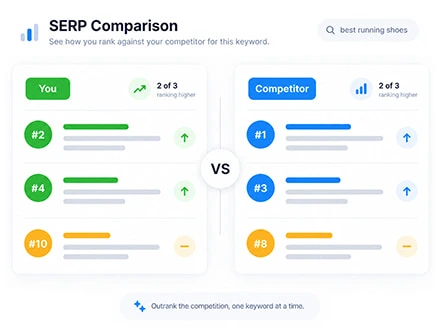
Choose competitors that appear for the searches you want to win. They may include a specialist business, a marketplace, or a publisher, depending on the query. Tracking up to 3 domains keeps the comparison focused on the websites most relevant to your project.
Compare positions for shared keywords under matching location and device settings. If a competitor stays ahead, examine the page that ranks: its purpose, content coverage, format, and usefulness to the searcher. Look for a specific improvement your own page needs.
Competitor rank tracking shows differences in recorded positions. It does not automatically reveal every keyword a competitor ranks for or explain their strategy. Use the comparison to guide deeper research instead of treating a ranking gap as a complete diagnosis.
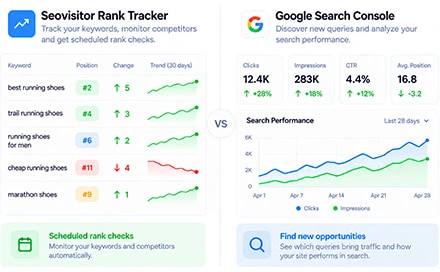
These tools answer different questions. Seovisitor follows the keywords and competitors you select through scheduled ranking checks. Google Search Console reports how your website appeared and performed in Google Search.
Search Console includes clicks, impressions, click-through rate, and average position. That average reflects recorded impressions within the report’s filters, so it may differ from a rank check made for a specific location, device, and time.
Use Seovisitor to follow your chosen keyword set and competitor movements. Use Search Console alongside it to discover relevant queries and assess whether changes in search visibility are accompanied by clicks.
Answers about ranking updates, project setup, and interpreting your results.
Each project supports up to 10 target keywords, and you can compare your rankings with up to 3 competitor websites. Choose a focused set of relevant terms to make the daily comparisons useful.
Rankings are updated daily. Each result represents a scheduled check, rather than a continuous live feed of every change in Google Search. Consider the date of the recorded result when comparing positions.
Search results can vary by location, device, time, and personalization. A manual search may therefore differ from the tracker’s recorded check. Compare the same keyword under matching settings before investigating a difference.
Not necessarily. A missing ranking may mean the website was not found within the results checked, or that a check did not complete. Check the project settings and result status first. Use Search Console’s URL Inspection tool when you need to investigate indexing.
No website plugin is required. Set up your domain, keywords, competitors, and available tracking options in Seovisitor, then follow the recorded results in your dashboard.
The tracker monitors the keywords you add to your project. Use keyword research or Search Console to find additional search terms, then select the ones you want to track. Competitor comparisons apply to the keywords included in your project.
The tool measures rankings; it does not change them. Its value is in helping you identify trends, compare competitors, and prioritize SEO work. Ranking improvements depend on the changes you make and how Google evaluates your pages.
No. A rank tracking project records your website’s positions for selected keywords. A keyword traffic campaign is a separate service with a different purpose. You can use the tracker without ordering traffic.
Add your website, choose up to 10 keywords, and compare up to 3 competitors. Start building a daily ranking history you can use to plan your next SEO move.
Start Tracking Keyword RankingsPractical guides, fresh ideas and proven strategies to help you grow smarter.
 All About Site Traffic
Find ChatGPT and other AI sources in GA4, audit assistant domains, build an optional custom channel and Exploration, and verify attribution with controlled tests.
 All About Site Traffic
Compare the 15 most visited websites worldwide using a sourced August 2026 snapshot. Understand each website’s purpose, how visits differ from users and app activity, and why traffic estimates need context.
 All About Site Traffic
Build a practical Google Ads and SEO workflow around shared customer insights, relevant landing pages, and clear channel responsibilities. Learn how to test messages and interpret results without confusing paid visits with organic growth.