

Great job! I was happy using Seovisitor on a few pages, and the results were noticeable. The traffic looked natural and helped improve engagement.

Daniel BrooksSEO Consultant
Send UK-targeted visits to a page on your website.

Buy UK website traffic with Seovisitor and send visits from the United Kingdom to a URL on your site. Set the number of visits per day, the length of your campaign, and the mix of mobile and desktop traffic.
You can also configure visit duration and additional pageviews. Follow delivery in your Seovisitor account and check the sessions your website records in GA4.
 Start Your Traffic Campaign
Sign up with Google and receive a $1 account bonus plus 500 Club Points.
Starting at just $0.08 per 100 visits





Choose a predefined Quick Order package for a faster setup, or use Advanced to customize the available traffic, targeting, session, device, and scheduling options for your campaign.
By selecting one of these plans, you can benefit from the following features:
Unlock these benefits by choosing the advanced options:
Choose the page that should receive your UK campaign visits.
Use the URL that matches your campaign. If you are launching a UK subscription plan, send visits to its pricing page. If you want to check how a new guide appears in analytics, use the guide itself. Starting on the exact page makes it easier to see where sessions begin.
For UK-only visits, choose Advanced and select United Kingdom in the order panel. The Quick Order packages above use worldwide traffic. Use the Advanced calculator to explore the visit settings, then check your country selection and the final invoice before paying.
Here, UK website traffic refers to visits delivered with the United Kingdom as the country target, based on IP geolocation. The country setting describes where visits are attributed. Your website language is a separate choice. An English-language page can serve several markets, so use the URL that presents the right offer for the UK.
This page is for direct visits to your website. Choose the traffic service according to how you want visits configured and use the country settings to define where they come from. In GA4, check geography and acquisition separately to see how the activity was recorded.
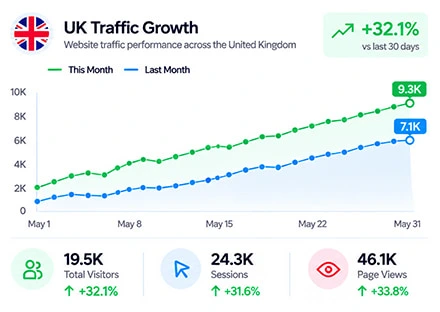
Subscription and software businesses can use a UK pricing page, plan comparison, or product demo. If the UK version shows prices in pounds, check that the URL keeps visitors on that version when they open it directly.
Service organisations can send visits to an overview or enquiry page that clearly explains who the service is for. If the offer is limited to one area, check which geographic options are available before choosing a nationwide campaign.
Publishers and membership websites can use an article, event page, or public membership overview. Pick a page people can open without a login, and check where its navigation leads if you enable additional pageviews.
hen placing your order, open the Set traffic region option in your user panel to view the available countries for geographic targeting. From the country list, select United Kingdom to designate the UK as the target location for your campaign. This setting helps direct your campaign toward the country you want to reach, allowing you to align your traffic settings with your regional marketing goals.
If you buy United Kingdom web traffic alongside your local SEO work, use the campaign to bring visits to the pages you already promote to a UK audience. Review organic rankings separately to see how those pages perform in UK search results.
If your business serves a particular city or area, check the available targeting options before you order. The United Kingdom setting targets the country as a whole. If appearing in Google’s local pack is part of your goal, monitor that visibility as part of your local SEO reporting.
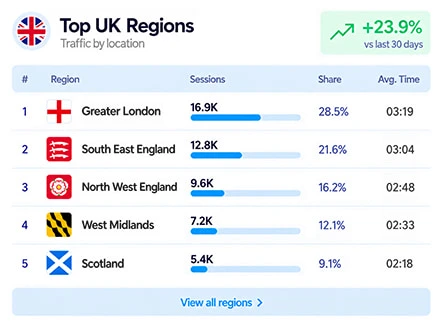
Driving visits to a UK-focused page can help your brand gain greater visibility among audiences in the market you want to reach. Whether you are promoting products, introducing a service, or publishing informative content, increasing the number of visits to relevant pages creates more opportunities for people to discover your brand and become familiar with what you offer. This can be particularly useful when expanding your online presence in the UK or supporting campaigns aimed at a specific regional audience.
You can also plan your direct traffic campaigns around a defined daily visit volume and campaign duration, making it easier to coordinate website visits with your wider marketing activities. This provides a predictable source of traffic that can run alongside visits from search engines, social media, and other channels. Over time, repeat visits may also help you understand whether people are returning to your website and becoming more familiar with your brand. By monitoring returning visitors alongside overall traffic in Google Analytics, you can gain a clearer picture of visitor engagement and audience retention.
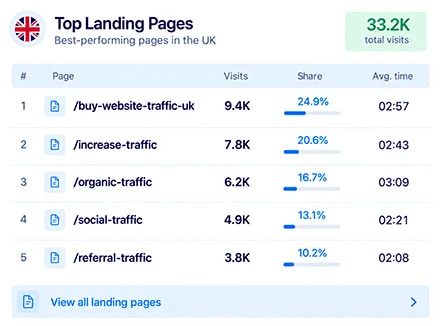
Before you buy UK web traffic, review the content, language and design from a UK visitor’s perspective. Give people a clear next step, use relevant UK testimonials where you have them and make the payment options available to UK customers easy to find.
Review bounce rate, session duration and the most viewed pages in analytics. The device mix and visit settings you choose can affect those figures. If visits often end quickly on a page, check how it loads and whether the content matches what visitors expect to find.
When you buy UK web traffic, review how your analytics records the sessions by source. Compare direct visits and visits from Google or Bing separately to see how people arrived at the same page.
Set the country, device mix, visit duration, and depth of browsing for your order.
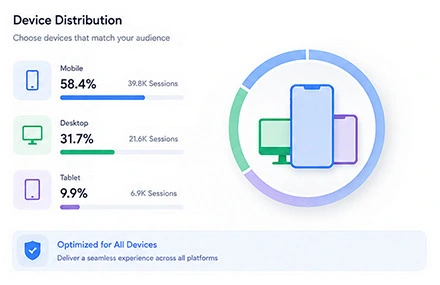
Use the existing device breakdown for the destination if you have one. A membership overview designed for people reading on their phones may need a different split from a desktop software demo. Match the campaign to the page and the experience you want to check.
Open the page on both device types before ordering. On a phone, check whether the key price or enquiry button is easy to reach and whether the consent banner affects the layout. On desktop, review tables and forms at the widths your website supports.
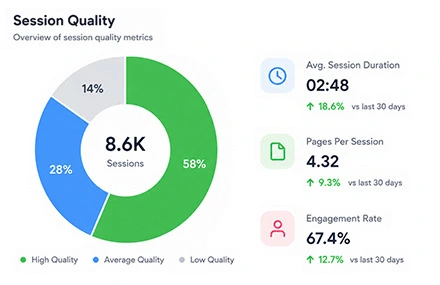
Plan the browsing settings around the pages you want to observe. A single announcement may only need entry-page visits. A membership campaign may also benefit from seeing activity beyond the overview, such as on linked eligibility or pricing pages.
Review the links that follow the landing page before enabling subpage visits. If a link moves from your UK site to an international pricing page or a separate portal, note where it leads. That makes it easier to interpret the paths and pageviews you see in analytics.
Start with a daily figure you can monitor. For example, 180 visits per day over seven days gives you 1,260 planned visits. Review the invoice again if you change the visit duration or add pageviews.
If the campaign needs to line up with a UK launch, compare the time shown in the order panel with UK local time. Check the date if your campaign is close to the switch between GMT and British Summer Time. Record the run dates alongside any email or social campaign sending visits to the same URL.
(Trust / Analytics badge)
| Real Chrome Human Traffic (SEOvisitor) | Bot / Fake / Proxy Traffic |
|---|---|
| Real Google Chrome Browser | Headless or Scripted Browsers |
| Residential & Valid IPs | Datacenter or Proxy IPs |
| Visible in Analytics & Clarity | Filtered & Blocked in Analytics |
| Natural Human Behavior | No Real Interaction |
| Ads-Safe Traffic | No-Safe |
| Low Detection Risk | Ads Account Risk |
| Money-Back Guarantee | No Refunds |
| Heatmap Recorded Sessions | High Bounce Rate |
Delivering real visitors from selected GEOs and regions
Explore our dedicated pages for popular GEO-targeted traffic locations:
View traffic by countryTrusted by 20,000+ users, processing over 400,000 orders
Real experiences from marketers, creators and website owners using Seovisitor.
Great job! I was happy using Seovisitor on a few pages, and the results were noticeable. The traffic looked natural and helped improve engagement.
I didn’t expect much at first, but after a few days I noticed better time on page. I mainly use it when launching new content.

I tried Seovisitor on a side project. The traffic increase was subtle but noticeable, and it gave me useful insights for testing new content layouts.

Seovisitor works well for older articles that have stopped getting attention, helping bring them back into circulation.

I’ve used the system several times and noticed an immediate change in my website stats.

This system was used for several blog posts and helped turn one article into one of the most visited. That was amazing.

I don’t run it all the time, only for specific campaigns. For controlled testing, it does the job well.
I applied Seovisitor to a few product pages. It helped me observe user patterns and refine my marketing strategy.
Using Seovisitor for my tech blog posts gave me a better sense of which topics readers engage with most. Very insightful.

Monitor incoming visits and view real-time campaign updates from your Seovisitor dashboard.

Find your order to check its status and visit totals by day. If the start time has passed, use the status and delivery report to see where the campaign stands. Keep the order ID and the dates you want checked if you contact support.
Set GA4 to the campaign dates and check the Country dimension in Demographic details for United Kingdom. Use the Landing page report or an exploration to check where sessions began. In Traffic acquisition, review Session source / medium to see how GA4 classified the activity.
Compare the same date range, time zone, and URL in both tools. Seovisitor reports delivery for the order. GA4 reflects the sessions your site records and may include other UK traffic to the same page. Consent choices, redirects, filters, and tracking settings can affect the comparison. If you use Microsoft Clarity, check available recordings to inspect layout and navigation.
When you buy UK traffic, check how the service identifies the country of each visit. Seovisitor uses IP geolocation for country targeting. In Google Analytics, you can review the sessions your site records during the campaign.
If you buy United Kingdom traffic for a product launch, use the campaign settings that fit the page you want to promote.
Still deciding whether to buy UK traffic? Start with a small campaign and review the visits it delivers before placing a larger order.
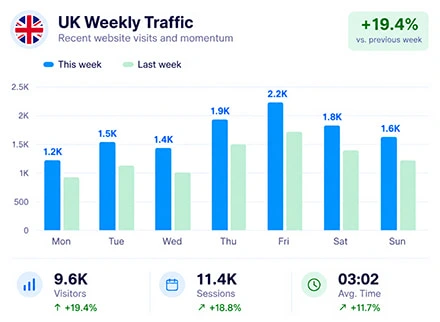
Create the best possible purchase United Kingdom Website Traffic Campaign and get the best feedback.

Before running any traffic campaign, make sure Google Analytics is properly installed and active. This tool provides accurate insights into user behavior, traffic sources, and campaign performance. Tracking data from the start ensures your traffic strategies deliver real, measurable results.
Make sure your server can handle the increased traffic. A reliable host ensures pages load quickly, prevents downtime, and maintains a smooth experience for users, even during peak traffic periods. This is essential for both user satisfaction and SEO signals.
Optimize your images, scripts, and page code to improve site speed. Faster-loading pages keep visitors engaged, reduce bounce rates, and make traffic campaigns look natural and effective. Proper optimization also supports SEO and overall website performance.
Answers about buying visits, UK targeting, campaign timing, and reporting.
The price depends on daily visits, campaign length, visit duration, and additional pageviews. Use the Advanced calculator to try different settings, then confirm United Kingdom and review your total in the order panel.
This page describes targeting at the United Kingdom level. If your order depends on a particular UK nation, city, or region, check the available selections with support before paying.
United Kingdom is the country setting for a UK campaign. If you also want visits from the Republic of Ireland, check the separate country options in your order. Use separate campaigns if the two markets have different URLs or reporting requirements.
You can use the public URL that fits your campaign, whether it is on a .co.uk domain, a .com domain, or a UK-specific path. Check the exact URL and any redirects before you submit the order.
Review the available start options on the payment screen. Once the order is paid, check its status and scheduled start in Orders. Use delivery statistics to see when visits begin to register for the campaign.
Open the order while it is unpaid or waiting to start and check the editing options. According to the panel guide, a running campaign cannot be paused or extended. A finished campaign renews only when auto-renew is enabled and payment succeeds.
Seovisitor reports visits delivered against the order, while GA4 counts the sessions your site records. Compare the same date range, time zone, and landing page. Then check filters, consent behaviour, and redirects if you need to investigate a difference.
The order covers delivery of website visits. Use Search Console to measure organic impressions, clicks, and average position for the United Kingdom separately from your campaign activity.
The service delivers visits automatically according to your campaign settings. Track qualified enquiries, subscriptions, and purchases separately in your own reporting, and use a test submission to verify that the form works.
Review Google’s guidance on purchased traffic before using an ad-supported destination. Publishers are responsible for traffic to their ads. An ad-free destination is an option when your goal is to check delivery or analytics.
Check the campaign status, start time, country, and destination saved on the order. If you still need help, contact support with the order ID and affected dates. Refund eligibility follows the terms for the order.
Practical guides, fresh ideas and proven strategies to help you grow smarter.
 All About Site Traffic
Select an old post using relevant Search Console queries, decide whether to keep or refresh it, audit its answer, add original value, and measure the result without assuming AI Overview inclusion.
 All About Site Traffic
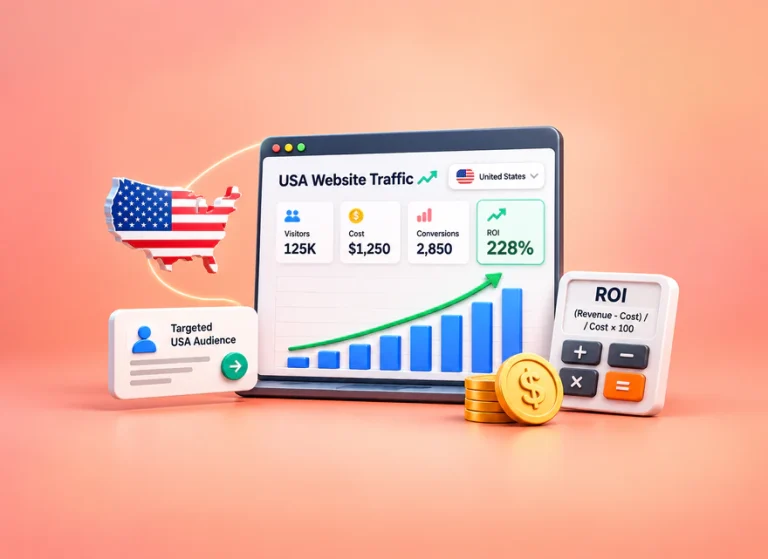
Calculate whether a USA-targeted website traffic campaign covers its full acquisition cost. Compare ROI with ROAS, follow a hypothetical margin and break-even example, and use verified outcomes to decide whether to stop, revise or continue.
 All About Site Traffic
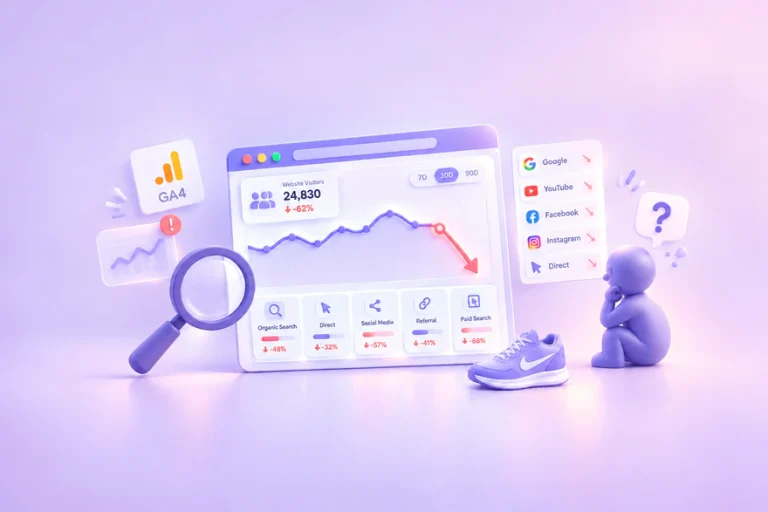
Investigate a sudden drop in website traffic before changing your site. Use a channel-by-channel process, practical worksheets and a hypothetical example to separate reporting changes from real losses.