

Great job! I was happy using Seovisitor on a few pages, and the results were noticeable. The traffic looked natural and helped improve engagement.

Daniel BrooksSEO Consultant
Order visits for the page you want to promote in Indonesia.

Buy Indonesia website traffic for a product page, service offer, or article. Choose Indonesia in Advanced, set your daily visits, campaign length, device category, and session options, then review the total before checkout.
 Start Your Traffic Campaign
Sign up with Google and receive a $1 account bonus plus 500 Club Points.
Starting at just $0.08 per 100 visits





Choose a predefined Quick Order package for a faster setup, or use Advanced to customize the available traffic, targeting, session, device, and scheduling options for your campaign.
By selecting one of these plans, you can benefit from the following features:
Unlock these benefits by choosing the advanced options:
Choose the page to include in your Indonesia traffic order.
Use a country-targeted campaign when a page serves customers or readers in Indonesia. A retailer might promote a collection it ships within Indonesia, a software company might use an Indonesian-language demo page, and a publisher might send visits to an article written for local readers.
Choose the URL that carries the offer. A product launch belongs on the product page, while a service campaign can send visitors to a page that shows where the service is available and how to book it. For an overview of other campaign types, see our website traffic service.
Indonesia website traffic refers to visits associated with IP addresses geolocated to Indonesia. You can receive visits from that country through several sources, including search, referrals, and direct visits. A Seovisitor order gives you a separate campaign for the URL you choose.
That URL can continue serving visitors from other markets. For example, you can use an existing product page for an Indonesia campaign if the product and terms shown on that page are available to shoppers there.
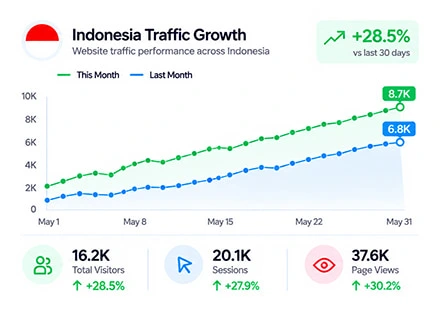
When you buy Indonesia website traffic through an Advanced campaign, Seovisitor focuses the campaign on IP locations associated with Indonesia instead of sending visits from a worldwide mix of countries. This gives you greater control over the geographic distribution of your traffic.
Indonesia targeting is available at the country level and can be combined with daily traffic volume, device type, session duration, internal pageviews, and campaign scheduling. These settings allow you to increase website traffic from Indonesia based on your website structure and campaign requirements.
This option is useful for websites with Bahasa Indonesia content, localized landing pages, regional services, and campaigns created for the Indonesian market. Country-targeted traffic can support website testing and regional analysis, but it does not guarantee customer interest, conversions, or search rankings.
Sign in to your Seovisitor user panel, enter the landing page URL, and open the Advanced campaign settings. Select Indonesia as the target country, then configure the daily traffic volume, session duration, device type, internal pageviews, campaign length, and preferred start time before submitting your order.
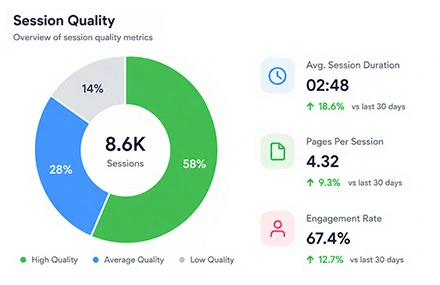
Website traffic from Indonesia can help you evaluate how a localized landing page performs during a controlled campaign. Review geographic reports, device categories, session duration, pageviews, and navigation activity to confirm that your analytics tools are recording the expected data.
Monitor incoming visits through the Seovisitor dashboard and compare the campaign statistics with Google Analytics, Microsoft Clarity, and your server data. These platforms may report different totals because they use different tracking methods, filters, consent settings, and session definitions.
Country and traffic source should also be analyzed separately. A session recorded from Indonesia may appear as direct, referral, social, search, or another source depending on how the analytics platform attributes the visit.
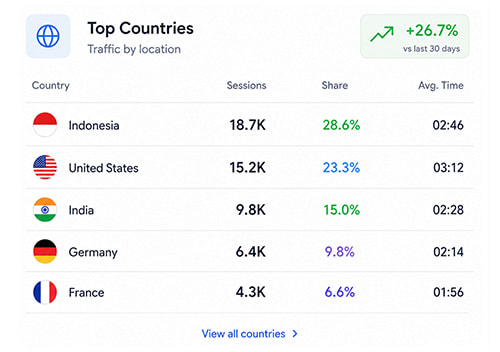
Buying website traffic from Indonesia gives you more control over where campaign visits are recorded. Instead of receiving traffic from unrelated locations, you can focus the campaign on Indonesian IP addresses and review how your website performs for this specific market.
Country-level targeting makes it easier to review geographic sessions, pageviews, devices, and navigation behavior associated with Indonesia in Google Analytics and Microsoft Clarity.
You can also increase website traffic from Indonesia gradually instead of sending a large number of visits at once. A controlled daily volume makes it easier to monitor hosting performance, tracking accuracy, and campaign activity before increasing the campaign size.
Indonesia website traffic is useful for localized landing page testing. It can help you check whether Bahasa Indonesia content, regional offers, contact forms, payment options, internal links, and conversion events are displayed and tracked correctly.
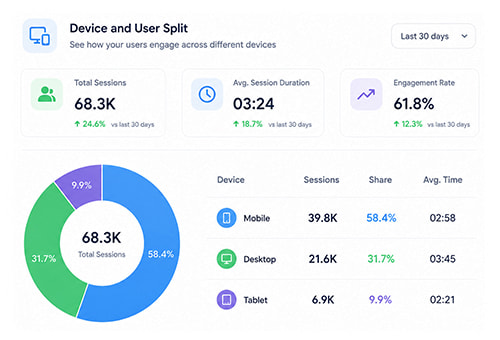
Increasing traffic volume is only one part of a successful campaign. Your landing page should provide clear content, mobile-friendly navigation, relevant calls to action, and accurate regional information. If your business serves Indonesia, consider using Bahasa Indonesia and displaying local pricing, contact methods, payment options, and service availability.
Use Google Analytics and Microsoft Clarity to review session duration, pageviews, navigation paths, scroll activity, and important events. If sessions end quickly, check page speed, mobile usability, content relevance, broken elements, and the placement of your main call to action.
Enable visits to additional internal pages and choose a suitable session duration to create multi-page sessions. These settings can reduce the bounce rate recorded for the campaign and provide more navigation data for testing internal links, page transitions, and analytics events.
Start with a moderate number of daily visits and monitor the campaign before increasing the traffic volume. This approach helps you identify hosting limitations, tracking problems, slow pages, or configuration issues without placing unnecessary pressure on your website.
Compare Seovisitor statistics with Google Analytics, Microsoft Clarity, and server logs to confirm that visits and pageviews are being recorded correctly. Small differences between platforms are normal because each system processes sessions and pageviews differently.
Indonesia website traffic can support regional testing, landing page analysis, and controlled traffic growth, but it does not guarantee search rankings, sales, leads, customer engagement, or conversions.
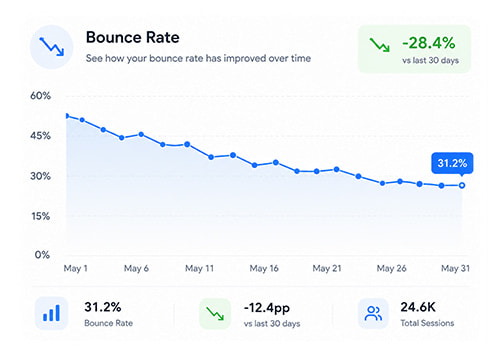
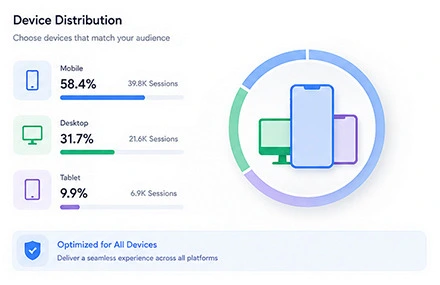
Choose the device category around the action visitors need to take. Mobile can suit a product page with a simple checkout. Desktop can make more sense for a software demo that involves a detailed comparison or a longer form.
Use your existing Indonesia traffic in GA4 to compare activity by device category. If you have Microsoft Clarity recordings, inspect how people use navigation, filters, and forms on the devices you are considering. Keep the URL and session settings consistent if you compare separate mobile and desktop orders.
Set the visit duration for the landing page, then choose how many additional pages to include and how long to spend on them. A short announcement may only need one pageview. A product collection can benefit from a path into individual product pages.
Keep the next step accessible through a relevant internal link, such as a link from a service overview to pricing. Review how visit duration and additional pageviews change the price before you submit the order.
Compare Seovisitor campaign traffic with basic script-only and request-based traffic sources.
| Seovisitor Website Traffic | Basic Scripted Traffic |
|---|---|
| Chrome-Based Browser Sessions | Headless or Request-Only Traffic |
| Country-Level Geo-Targeting | Random or Uncontrolled Locations |
| Visible in Supported Analytics Tools | May Be Filtered or Not Recorded |
| Configurable Session Duration | Limited or No Session Control |
| Optional Internal Pageviews | Single-Page Requests |
| Mobile and Desktop Settings | Limited Device Configuration |
| Live Campaign Statistics | Limited or Unverified Reporting |
| Tracking Support and Refund Review | Limited Support or No Refund Policy |
Choose from supported countries for your geo-targeted traffic campaign.
Explore our dedicated pages for popular GEO-targeted traffic locations:
View traffic by countryTrusted by 20,000+ users, processing over 400,000 orders
Real experiences from marketers, creators and website owners using Seovisitor.
Great job! I was happy using Seovisitor on a few pages, and the results were noticeable. The traffic looked natural and helped improve engagement.
I didn’t expect much at first, but after a few days I noticed better time on page. I mainly use it when launching new content.

I tried Seovisitor on a side project. The traffic increase was subtle but noticeable, and it gave me useful insights for testing new content layouts.

Seovisitor works well for older articles that have stopped getting attention, helping bring them back into circulation.

I’ve used the system several times and noticed an immediate change in my website stats.

This system was used for several blog posts and helped turn one article into one of the most visited. That was amazing.

I don’t run it all the time, only for specific campaigns. For controlled testing, it does the job well.
I applied Seovisitor to a few product pages. It helped me observe user patterns and refine my marketing strategy.
Using Seovisitor for my tech blog posts gave me a better sense of which topics readers engage with most. Very insightful.

Monitor incoming visits and view real-time campaign updates from your Seovisitor dashboard.

To review website traffic from Indonesia in Google Analytics 4, open the Demographic details report and use the Country dimension to filter the data for Indonesia. You can then review users, sessions, pageviews, engagement, devices, and other recorded activity associated with this location.
Traffic source should be reviewed separately in the Traffic acquisition report. Indonesian sessions may appear as direct, organic search, referral, social, or another source depending on how the visit is attributed. Country and source are separate dimensions, so traffic from Indonesia should not automatically be described as (direct) / (none).
Seovisitor, Google Analytics, Microsoft Clarity, and server logs may report different totals. Consent settings, browser restrictions, analytics filters, script-loading errors, blocked requests, redirects, and different session definitions can affect how visits and pageviews are recorded.
Microsoft Clarity can help you review recorded sessions, page navigation, scroll activity, clicks, and device behavior during the campaign. Confirm that the Clarity script is installed on the landing page and any additional pages included in the order.
Complete these checks before starting your campaign to improve tracking accuracy and website performance.
Before launching your campaign, confirm that Google Analytics or Microsoft Clarity is installed correctly. Proper tracking helps you verify recorded visits, review session activity, and compare Seovisitor statistics with the data recorded on your website.
Make sure your hosting can handle the selected daily traffic volume. Reliable server performance helps prevent slow loading, temporary errors, and downtime while keeping your website accessible throughout the campaign.
Compress large images, remove unnecessary scripts, and test the target page on mobile and desktop. A fast, functional landing page improves tracking accuracy and prevents technical issues from affecting traffic tracking.
Answers about targeting, order settings, and campaign tracking.
Review the destination page and the policies of any advertising or affiliate program you use before ordering. The campaign gives you control over settings such as volume and location, while third-party platforms decide how they handle purchased visits.
Sign in to Seovisitor, open Advanced, and enter the public URL of your landing page. Under Set traffic region, choose Indonesia, then review the available visit, scheduling, and device options before placing the order.
Use Advanced to select Indonesia. Quick Order uses worldwide traffic and is suitable when you are comfortable with visits from a mix of countries.
Indonesia targeting applies nationwide. If your offer is limited to Jakarta, Bali, or another specific area, use an acquisition channel that supports that geographic boundary.
Yes. Advanced lets you set daily visits and campaign length, then select the available device category, landing page duration, and additional pageview settings.
They can affect how engagement and bounce rate are recorded. Read those metrics alongside the session settings you selected and track inquiries, checkout starts, or purchases separately.
Visits can be recorded when the relevant tags load and the tools collect the activity. Check the destination and campaign dates in each tool, and account for differences in consent settings, filters, and how the tools count visits.
Organic rankings are a separate outcome. Use the campaign to review a localized landing page and check navigation or tracking. Follow organic impressions and clicks separately in Search Console.
Check the start time and status shown in your Seovisitor order. Once the campaign is active, use the dashboard to follow incoming visits.
Scheduled visits for that order stop when it ends. Your site can continue receiving visits from other sources, so review the campaign period separately when comparing traffic.
Check the rules of your ad network or monetization provider before purchasing. Each provider sets its own policies for purchased visits and how it counts eligible impressions or clicks.
Check the final landing page URL, tag loading, consent settings, and filters. If the issue persists, contact Seovisitor support with the order ID, affected dates, and the reports you compared.
The total depends on the options selected in Advanced, including visit volume, campaign length, and browsing settings. Review the final price in the order form before checkout.
Practical guides, fresh ideas and proven strategies to help you grow smarter.
 All About Site Traffic
Select an old post using relevant Search Console queries, decide whether to keep or refresh it, audit its answer, add original value, and measure the result without assuming AI Overview inclusion.
 All About Site Traffic
Calculate whether a USA-targeted website traffic campaign covers its full acquisition cost. Compare ROI with ROAS, follow a hypothetical margin and break-even example, and use verified outcomes to decide whether to stop, revise or continue.
 All About Site Traffic
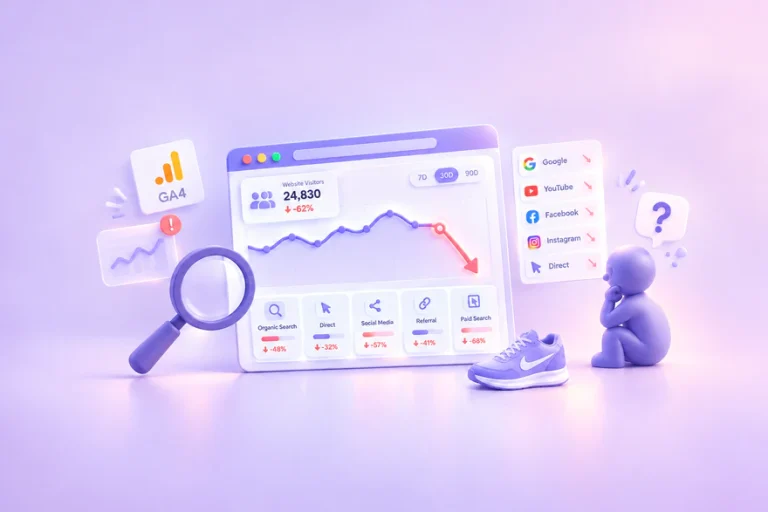
Investigate a sudden drop in website traffic before changing your site. Use a channel-by-channel process, practical worksheets and a hypothetical example to separate reporting changes from real losses.