


Learn how to measure actual keyword clicks, estimate traffic potential, compare keyword opportunities, and select the right keyword using a practical step-by-step process.
Keyword traffic is not a single number. It may refer to how often people search for a keyword, how many visits a page could potentially receive, or how many clicks your website has actually earned from that query.
These measurements are related, but they are not interchangeable. A keyword with 10,000 monthly searches may generate less useful traffic than a specific phrase with 1,000 searches and stronger intent.
In this guide, you will learn how to check keyword traffic, compare opportunities, estimate potential clicks, and avoid the most common interpretation mistakes.

Turn keyword research into a focused search campaign and measure the visits it generates.
Quick Answer: How Do You Check Keyword Traffic?
Use the method that matches your situation:
- If your website already appears in Google, use Google Search Console to measure actual impressions, clicks, CTR, and average position.
- If you are researching a new keyword, use Google Keyword Planner or an SEO platform to estimate monthly search volume.
- If you want to compare seasonality or regional interest, use Google Trends.
- If you want to estimate potential visits, multiply search volume by a realistic organic CTR for the ranking position you expect to reach.
- If you are comparing keywords, evaluate intent, competition, SERP layout, traffic potential, and business value—not search volume alone.
The most reliable decision normally comes from combining several signals instead of trusting a single tool.
Search Volume, Keyword Traffic, and Traffic Potential Are Different
Before comparing keywords, you need to understand what each metric measures.
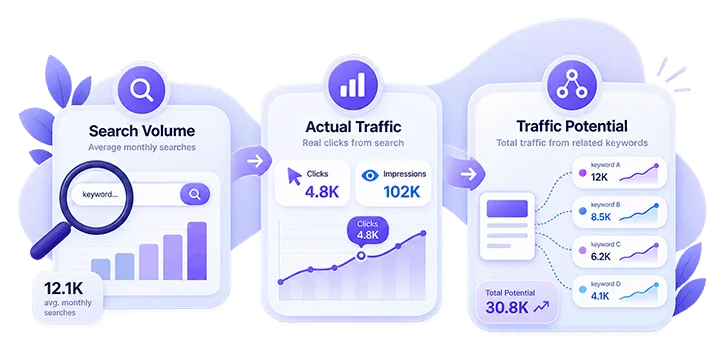
Search Volume
Search volume is an estimate of how many times a keyword is searched during an average month. It describes demand for the query, not the number of visitors your website will receive.
A keyword with 5,000 monthly searches does not automatically send 5,000 visits to the top-ranking website. Clicks may be divided between organic results, advertisements, videos, shopping results, featured answers, and other search features.
Actual Keyword Traffic
Actual keyword traffic is the number of visits your website has already received from a particular query. For Google organic search, Google Search Console is the most dependable first-party source. It reports the clicks and impressions recorded for your own website instead of estimating another website’s performance.
Traffic Potential
Traffic potential estimates the total organic traffic a page could receive from its complete topic—not only from one exact keyword. A useful page can rank for many related searches. Therefore, a lower-volume primary keyword may still lead to substantial traffic when the page also ranks for variations, questions, synonyms, and long-tail searches.
How to Check Actual Keyword Traffic in Google Search Console
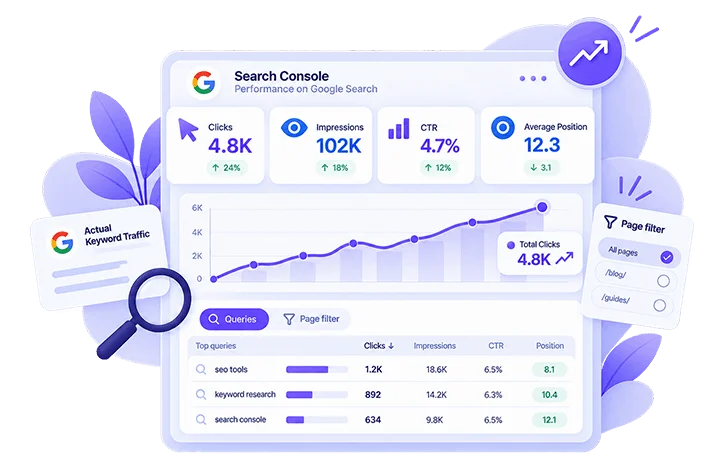
The Google Search Console Performance report shows the queries that caused your website to appear in Google Search. Follow these steps:
- Open Google Search Console and select the correct property.
- Go to Performance → Search results.
- Select a meaningful date range, such as the last 3, 6, 12, or 16 months.
- Open the Queries tab to view search terms.
- Add a Page filter if you want to analyze a specific article or landing page.
- Enable Clicks, Impressions, Average CTR, and Average Position.
- Compare the current period with the previous period when enough data is available.
- Check Countries and Devices when location or mobile behavior could affect the result.
Interpret Search Console Metrics
Each metric answers a different question:
- Impressions: How often did the page appear in eligible Google results?
- Clicks: How many visits did Google Search generate?
- CTR: What percentage of impressions became clicks?
- Average position: Approximately where did the page’s highest result appear across recorded searches?
High impressions with very few clicks can indicate weak rankings, an uncompetitive title, a poor snippet, mismatched search intent, or SERP features that reduce organic clicks.
Low impressions may indicate insufficient relevance, limited search demand, weak internal discovery, indexing problems, or a page that does not cover the subject deeply enough.
Find the Best Opportunities
Look for queries that have:
- Clear relevance to the page
- Meaningful impressions
- A position close enough to improve
- Low CTR compared with their visibility
- Strong informational or commercial value
- A realistic connection to your products, services, or expertise
Do not optimize a page for every query in the report. Group related queries by intent and choose one clear primary subject for the page.
How to Estimate Keyword Traffic Before You Rank
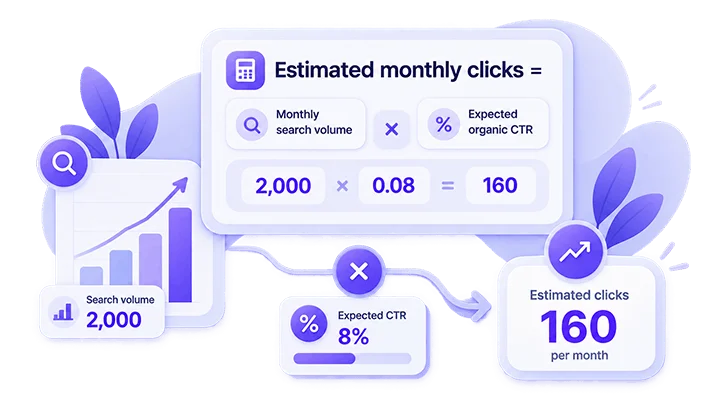
New content has no Search Console history. In that situation, estimate potential traffic using search volume and expected CTR. A simple formula is:
Estimated monthly clicks = Monthly search volume × Expected organic CTR
Suppose a keyword has 2,000 monthly searches and you expect a ranking position that may earn an 8% CTR:
2,000 × 0.08 = 160 estimated monthly clicks
This is a planning estimate—not a guarantee. Actual performance can change because of ranking position, search intent, country, language, device, seasonality, advertisements, AI answers, other SERP features, brand familiarity, and the number of related queries the page ranks for.
Estimate a Topic, Not Only One Keyword
A better forecast includes the primary keyword and its close variations. For example, a page about checking keyword traffic may also appear for:
- keyword traffic checker
- estimate keyword traffic
- keyword search traffic
- check keyword search volume
- keyword traffic analysis
- compare keyword traffic
Estimate these terms as a group, remove obvious overlaps, and apply conservative CTR assumptions. This provides a more realistic picture than evaluating only one exact phrase.
Six Useful Tools for Checking Keyword Traffic
No single tool answers every question. Select the tool based on the data you need.
1. Google Search Console
Google Search Console is best for actual Google impressions and clicks, page-specific query data, CTR, average position, and measuring results after an update. It only reports data for properties you can access; it is not a competitor traffic estimator.
2. Google Keyword Planner
Google Keyword Planner is useful for discovering keyword ideas, comparing average monthly searches, adjusting country and language targeting, reviewing seasonal patterns, and evaluating commercial signals.
Make sure every keyword uses the same location, language, network, and date settings before comparing the results.
3. Google Trends
Google Trends compares relative search interest across terms, locations, and time periods. It is especially useful when demand is seasonal, terminology changes over time, or regional wording differs.
Google Trends shows relative interest, not an exact monthly traffic total. Use it alongside search-volume and performance data.
4. Ahrefs
Ahrefs can help estimate search volume, keyword difficulty, traffic potential, related queries, ranking pages, and competitor keyword traffic. Third-party traffic figures are estimates and may differ from first-party analytics.
5. Semrush
Semrush can be used to review keyword volume, search intent, ranking difficulty, SERP features, keyword variations, competitor rankings, and estimated traffic.
Keep the selected country database consistent. Comparing one keyword in the United States database with another in a different country database produces a misleading result.
6. Google Search Results
A manual Google search provides information that keyword tools cannot fully explain. Review the type of pages ranking, dominant intent, advertisements, AI answers, featured snippets, videos, images, and the freshness and depth of competing pages.
If Google mainly ranks interactive tools, publishing another general definition article may not satisfy the query—even when the keyword has strong search volume.
How to Compare Two Keywords Step by Step
Use the following process when choosing between two opportunities.
Step 1: Confirm That the Intent Matches
Read the search results for both terms. Determine whether users want information, a comparison, a tool, a product, or a service. A keyword is not valuable merely because it is popular. It must match the page you can realistically create and the audience you want to attract.
Step 2: Compare Data Under the Same Conditions
Use the same country, language, device assumptions, date range, search network, keyword database, and match interpretation. Without consistent settings, the numbers cannot be compared fairly.
Step 3: Review Search Volume and Trend
Search volume shows estimated demand. Trends show whether that demand is stable, seasonal, rising, or declining. A stable 1,500-search keyword can sometimes be a better long-term target than a temporary trend with 5,000 searches.
Step 4: Estimate Realistic Clicks
Do not assume you will immediately rank first. Calculate several scenarios based on realistic target positions.
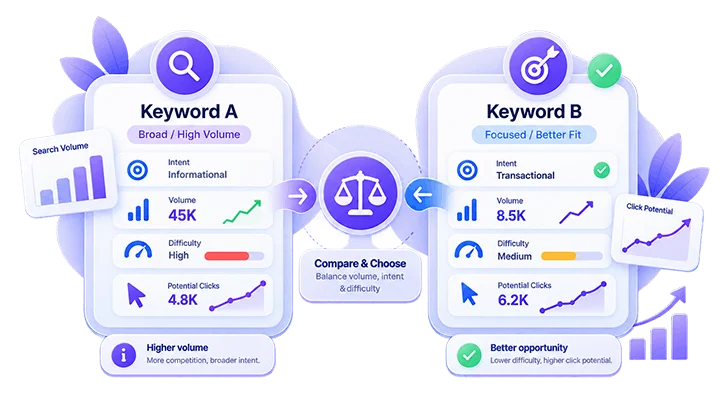
- Keyword A: 5,000 searches, broad intent, difficult SERP
- Keyword B: 1,500 searches, specific intent, achievable SERP
Keyword B may generate fewer total visits but more relevant visitors and better business results.
Step 5: Evaluate the Entire Topic
Check whether the ranking pages receive traffic from many related searches. A topic with several useful subqueries can outperform a keyword that has a higher individual volume but limited topical depth.
Step 6: Consider Business Value
Ask whether the searcher has a problem you solve, whether the page can naturally lead to another useful resource or service, whether the visitor is likely to take a meaningful next step, and whether you can provide stronger experience than existing results.
The strongest keyword is normally the one that balances traffic opportunity, relevance, ranking feasibility, and conversion potential.
Metrics That Matter Beyond Search Volume
Search volume should never be your only filter.
Search Intent
The page must deliver the result users expect. A mismatch between informational and commercial intent can prevent a page from ranking even when the keyword is included correctly.
Ranking Difficulty
Difficulty scores are estimates. Review the actual ranking pages, their topical quality, authority, backlinks, and content format before making a decision.
SERP Click Opportunity
A result page filled with advertisements, instant answers, maps, shopping results, or other features may produce fewer organic clicks than its search volume suggests.
Conversion Potential
Relevant traffic is usually more valuable than large volumes of unfocused visits. Consider the action a visitor may take after reading the page.
Location and Language
The same keyword can have different demand and intent in different countries. Always use the location that matches your target audience.
Content Quality and Coverage
A page can rank for many variations when it answers the full subject clearly. Use related terms naturally, but avoid forcing keywords into every paragraph.
Common Keyword Traffic Mistakes
Avoid these mistakes when analyzing keyword opportunities:
- Treating search volume as guaranteed website traffic
- Comparing data from different countries or time ranges
- Trusting one SEO tool without checking other signals
- Selecting keywords only because they have high volume
- Ignoring user intent
- Confusing page traffic with traffic from one keyword
- Assuming third-party estimates are exact
- Ignoring seasonal changes
- Using unrealistic CTR assumptions
- Ignoring zero-click search features
- Targeting several unrelated intents on one page
- Choosing a keyword without reviewing the current SERP
A Practical Keyword Traffic Checklist
Before selecting a keyword, confirm the following:
- The keyword matches your audience and page purpose.
- Search intent is clear.
- Location and language settings are correct.
- Search volume has been checked.
- Seasonality has been reviewed.
- Current ranking pages have been examined.
- Ranking difficulty appears realistic.
- SERP features have been considered.
- Potential clicks have been estimated conservatively.
- Related queries have been grouped into one topic.
- Business and conversion value have been evaluated.
- A measurement plan has been prepared in Search Console.
Final Thoughts
The best keyword is not always the phrase with the highest search volume. A useful keyword must combine relevant intent, achievable competition, sufficient demand, organic click opportunity, and real value for your website.
Use Search Console for actual performance, Keyword Planner and SEO tools for demand estimates, Google Trends for timing, and a conservative CTR formula for traffic forecasts.
Most importantly, compare keywords under the same conditions and validate the decision by studying the real search results. This produces a more reliable content strategy than following a single traffic number.
Frequently Asked Questions
Quick answers to common questions about how to check keyword traffic
Keyword traffic is the number of visits your website receives from people searching for a specific query. It is different from search volume, which estimates how many times a keyword is searched. A keyword may have high search volume but still generate limited traffic if your ranking is low or the search results attract fewer organic clicks.
Search volume represents estimated search demand, while keyword traffic represents the visits or clicks a website actually receives. Search volume should therefore be treated as an opportunity metric rather than a guarantee of traffic. Rankings, CTR, search intent, SERP features, location, seasonality, and competition all affect how much traffic a keyword can produce.
Google Search Console is the best starting point for measuring actual keyword performance on your own website. It shows clicks, impressions, CTR, and average position for queries where your pages appear in Google Search. However, it cannot provide first-party traffic data for competitors, so third-party SEO tools are needed for competitor estimates.
No. A lower-volume keyword can sometimes be a better SEO opportunity if it has clearer search intent, lower ranking difficulty, stronger conversion potential, and a more achievable SERP. The best keyword is usually the one that balances traffic potential, relevance, ranking feasibility, and business value rather than simply having the highest search volume.
No. Google Trends measures relative search interest rather than exact monthly search volume or website traffic. It is most useful for comparing keywords over time, identifying seasonal demand, detecting rising or declining interest, and comparing terminology across locations. For stronger analysis, combine Trends data with search-volume estimates and Search Console performance data.
Ahrefs, Semrush, and similar SEO platforms can provide useful estimates for search volume, traffic potential, keyword difficulty, competitor rankings, and related queries. However, their traffic numbers are modeled estimates rather than first-party analytics. They are best used for comparison and research rather than treated as exact measurements of actual website traffic.
First, make sure both keywords are being compared under the same country, language, date range, search network, and database settings. Then compare their search intent, search volume, trend, ranking difficulty, SERP features, realistic CTR, related-query potential, and business value. This provides a much more useful comparison than looking at search volume alone.
Search volume does not account for everything that happens on the search results page. Ads, AI answers, featured snippets, maps, shopping results, videos, and other SERP features can reduce the number of clicks available to traditional organic results. Ranking position and how well your page matches search intent also have a major effect on CTR.
Estimating the entire topic is usually more realistic. A well-optimized page can rank for the primary keyword as well as multiple closely related queries and variations. Group related terms by the same search intent, remove obvious overlaps, and estimate their combined opportunity rather than assuming the page will receive traffic from only one exact keyword.




Comments
Leave a Comment