


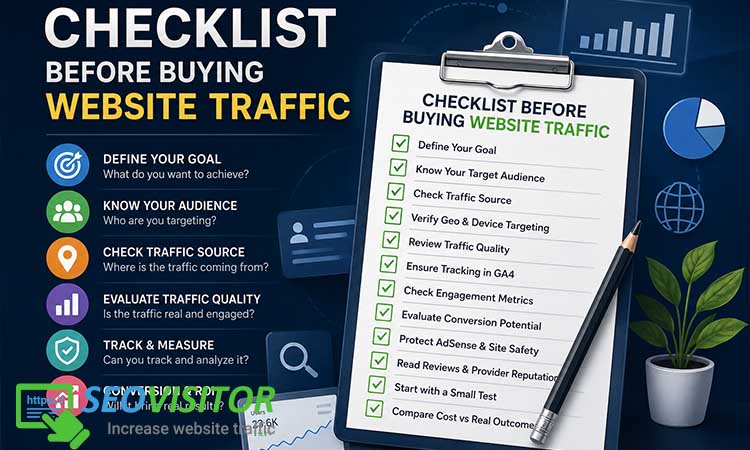
Checklist Before Buying Website Traffic: What to Check Before You Pay
Buying websitetraffic can feel tempting when your site is new, your blog posts are not getting enough visibility, or your landing pages need visitors fast. The promise sounds simple: pay for a traffic package, receive visitors, and watch your numbers grow. But the real problem is not whether you can buy visitors. The real question is whether those visitors are real, relevant, trackable, safe, and capable of producing value.
That is why having a clear checklist before buying website traffic matters. Without one, you may end up paying for empty sessions, fake visitors, bot traffic, low-quality referrals, or traffic that looks impressive in analytics but does nothing for your business. Worse, poor traffic can distort your Google Analytics data, damage your conversion analysis, and create problems for ad-monetized websites.
This guide gives you a practical, step-by-step framework for evaluating traffic before you spend money. You will learn what to check, which red flags to avoid, how to track traffic quality in GA4, and how to decide whether a traffic campaign is worth scaling.
What Does Buying Website Traffic Actually Mean?
Buying website traffic means paying to bring visitors to a website through a third-party source. This can include display ads, native ads, push notifications, referral placements, social campaigns, ad networks, traffic marketplaces, or direct traffic packages. However, not every type of paid traffic is equal.
There is a big difference between running a targeted Google Ads campaign and buying a cheap traffic package from an unknown provider. Both may send visitors, but the quality, intent, source transparency, and conversion potential can be completely different.
A serious marketer does not buy traffic simply to increase a visitor count. The goal should be to attract people who match the offer, understand the message, interact with the page, and take a meaningful action. That action may be signing up, buying a product, reading multiple pages, clicking an affiliate link, joining an email list, or simply becoming aware of a brand.
Paid Traffic vs Purchased Traffic vs Organic Traffic
Paid traffic usually refers to visitors from advertising platforms such as Google Ads, Meta Ads, LinkedIn Ads, native ad platforms, or other paid media channels. These campaigns often provide targeting controls, reporting dashboards, budget settings, and optimization options.
Purchased traffic is a broader term. It may include traffic packages sold by vendors who promise a certain number of visits over a specific period. Some providers use legitimate ad placements or partner networks. Others may use low-quality sources, incentivized clicks, automated visits, bots, or misleading redirects.
Organic traffic comes from unpaid sources such as search engines, social sharing, direct brand discovery, and referral links. Organic traffic is usually slower to build, but it is often more sustainable because it is connected to content quality, search intent, backlinks, authority, and audience trust.
A smart strategy may include both organic and paid acquisition. But buying traffic should never be treated as a replacement for SEO, content quality, conversion optimization, or audience research.
Why People Buy Website Traffic
Website owners usually consider buying traffic for one of several reasons. A new website may need initial visitors to test landing pages. An ecommerce store may want to see how U.S. visitors respond to a product page. A blogger may want to increase exposure to a new article. An affiliate marketer may want more visitors to test a content funnel. A SaaS founder may want to validate messaging before investing heavily in ads.
These are all understandable goals. The mistake happens when people buy traffic without defining what success looks like. More visitors alone is not a strategy. A traffic campaign should answer a specific business question, such as:
Will this landing page convert cold visitors?
Are U.S. visitors more valuable than global visitors?
Does mobile traffic behave differently from desktop traffic?
Which page gets the most engagement?
Can this offer produce leads at an acceptable cost?
Is the traffic source real and measurable?
When buying traffic is treated as a test, it can provide useful data. When it is treated as a shortcut to success, it often leads to disappointment.
read more: Increase Website Traffic Without Google Ads
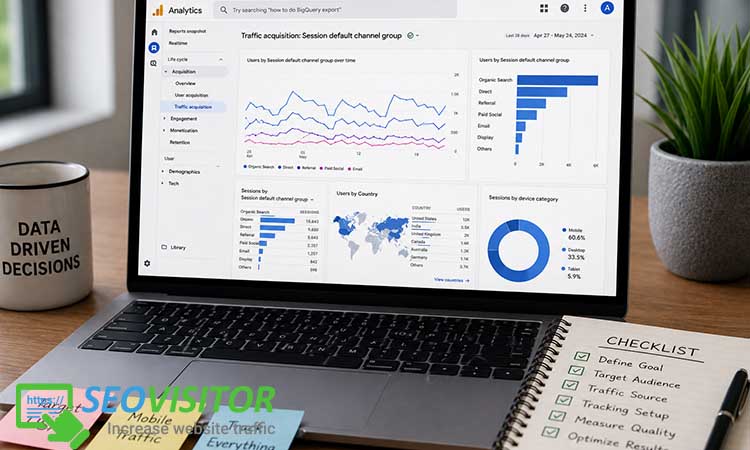
Why You Need a Checklist Before Buying Website Traffic
A checklist before buying website traffic helps you slow down and evaluate the campaign before your budget disappears. Many traffic offers are designed to look attractive: large visitor numbers, low prices, fast delivery, and bold claims. But those numbers mean very little unless the traffic is relevant and measurable.
The checklist protects you from three common problems: fake traffic, bad data, and poor business decisions.
Not All Website Traffic Is Real or Useful
Some traffic may come from real people. Some may come from low-quality placements. Some may come from bots or automated systems. Some may technically show up in analytics, but the users may have no interest in your offer.
This distinction matters because traffic quality affects everything that happens after the visit. Real targeted visitors may read, scroll, click, compare, subscribe, or purchase. Low-quality visitors may leave immediately. Bot traffic may create sessions without any meaningful engagement.
High traffic numbers can create a false sense of progress. A website owner may see a sudden spike and assume the campaign worked. But if there are no conversions, no engagement, no scroll depth, no secondary pageviews, and no useful behavioral data, the traffic did not create real business value.
Bad Traffic Can Damage Your Analytics Data
One of the most overlooked risks of buying website traffic is data pollution. When low-quality traffic enters your GA4 reports, it can distort your understanding of how people interact with your site.
For example, imagine that your normal organic visitors spend two minutes on a page, click internal links, and occasionally convert. Then you buy a traffic package that sends thousands of visitors who leave within seconds. Suddenly, your engagement metrics look weaker. Your landing page appears worse than it really is. Your conversion rate drops. Your source reports become harder to interpret.
This can lead to bad decisions. You may rewrite a good landing page, stop promoting a strong offer, or misjudge your audience because your analytics data has been contaminated by poor traffic.
Some Traffic Can Create Monetization Risks
If your website uses AdSense or another ad monetization platform, traffic quality becomes even more important. Ad platforms care about genuine user interest. Artificial impressions, suspicious clicks, incentivized visits, and invalid traffic can create serious account risks.
This does not mean every form of paid traffic is unsafe. It means ad-monetized websites must be more careful than ordinary sites. You need to know where the traffic comes from, whether it is real, how users behave, and whether the campaign could trigger invalid traffic concerns.
For ad-supported websites, buying cheap traffic just to increase ad impressions is especially risky. A better approach is to focus on real users, transparent sources, gradual delivery, and strong monitoring.
The Complete Checklist Before Buying Website Traffic
Use this checklist before choosing a provider, buying a package, or sending traffic to an important page.
1. Define Your Goal Before Buying Traffic
Start with the outcome. Do you want sales, leads, email subscribers, affiliate clicks, content engagement, brand awareness, app installs, or retargeting audiences?
Different goals require different traffic. If you want ecommerce sales, you need visitors with buyer intent. If you want newsletter subscribers, you need people interested in your topic. If you want to test a landing page, you need trackable visitors who match your target audience. If you want awareness, engagement metrics may matter more than immediate purchases.
A vague goal leads to vague results. “I want more traffic” is not enough. A stronger goal would be: “I want to test whether U.S. mobile visitors convert on this product page at a cost per add-to-cart below $5.” That kind of goal makes the campaign measurable.
Before buying traffic, write down your target action, target audience, tracking method, test budget, and success metric.
2. Know Your Target Audience
The best traffic source is the one that matches your audience. Before buying website traffic, define who should visit your site.
Consider country, language, device, interests, age range, buyer intent, and funnel stage. For example, USA website traffic may be valuable if you sell to U.S. customers, monetize with U.S.-focused advertisers, promote affiliate offers available in the United States, or publish content for an American audience. But U.S. traffic is not automatically better if your product is not relevant to that market.
Audience mismatch is one of the biggest reasons traffic campaigns fail. You may receive real visitors, but if they are not interested in your offer, they will not convert.
Ask yourself:
Who is this page for?
What problem does the visitor want to solve?
Is the offer available in the visitor’s location?
Is the page written in the right language?
Does the traffic source match the user’s intent?
3. Check Whether the Traffic Is Real Human Traffic
Real human traffic means actual people are visiting your website, not automated scripts or bots. This is one of the most important checks.
A trustworthy provider should be able to explain how traffic is generated. They may use ad placements, content discovery networks, social promotion, push campaigns, or partner websites. They may not reveal every private partner, but they should at least explain the general source category.
Be cautious with vague claims such as “premium traffic,” “instant traffic,” or “guaranteed visitors” without any explanation. Also be careful with offers that promise huge traffic volumes at extremely low prices. Real attention has a cost.
Practical tip:
Ask the provider whether the visitors are human, whether the source is ad-based or referral-based, and whether the traffic is allowed for your type of website.
4. Ask Where the Traffic Comes From
Traffic source transparency is essential. A provider that refuses to explain the origin of traffic creates risk.
Possible traffic sources include display ads, native ad placements, push notifications, expired domain redirects, partner networks, social media campaigns, search ads, newsletter placements, or content recommendation widgets. Each source has different quality expectations.
For example, native ad traffic may be good for content discovery. Search traffic may have stronger intent. Push traffic may be fast but variable in quality. Referral traffic may work if the referring sites are relevant. Redirect traffic may produce poor engagement if users did not intentionally choose your page.
You do not need every technical detail, but you need enough information to judge whether the traffic source makes sense for your goal.
5. Avoid Unrealistic Traffic Packages
One of the easiest ways to spot low-quality traffic is to compare the promise with reality. If a provider offers 100,000 visitors for the price of a coffee, you should be skeptical.
Traffic has a cost because attention has a cost. Real people must come from somewhere: ads, placements, recommendations, emails, social posts, or partner sites. If the price is extremely low, the provider may be using low-quality sources, automated visits, untargeted traffic, or traffic that has little chance of engagement.
Cheap traffic is not always fake, but it usually comes with trade-offs. It may be less targeted, less engaged, less transparent, or less likely to convert. Instead of asking, “How many visitors can I get?” ask, “What kind of visitors am I getting, and what can they realistically do?”
6. Check Geo-Targeting Options
Geo-targeting is especially important if you want visitors from a specific country, state, or city. For example, a U.S.-based ecommerce store may want only USA traffic because shipping, pricing, payment options, and customer support are built around American buyers.
Ask whether the provider offers country targeting, state targeting, city targeting, or regional targeting. Also ask how accurate that targeting is. Some providers may offer broad geo-targeting, while others may support more granular options.
Geo-targeting also affects analytics. If you buy USA traffic but your GA4 reports show visitors from unrelated regions, something may be wrong with the campaign quality or targeting accuracy.
7. Review Device Targeting
Mobile and desktop visitors behave differently. Mobile users may browse quickly, scroll more, and convert less often on complex forms. Desktop users may spend more time comparing products, reading long-form content, or completing checkout flows.
Before buying website traffic, decide whether your landing page is better suited for mobile, desktop, or both. Then check whether the provider can deliver device-specific traffic.
This matters because a weak mobile page can ruin a campaign. If your page loads slowly, has tiny buttons, uses intrusive pop-ups, or has a difficult checkout process, mobile traffic may bounce quickly. Before sending paid traffic, test your page on multiple screen sizes.
Suggested internal link:
Add an internal link to “mobile landing page optimization checklist.”
8. Check Traffic Speed and Delivery Time
Traffic delivery speed can affect how natural and manageable the campaign looks. A sudden spike of thousands of visitors in a few minutes may make analytics harder to interpret. It may also create server load problems for smaller websites.
Gradual delivery is often better. It allows you to monitor performance, compare daily behavior, detect suspicious patterns, and stop the campaign if quality is poor.
Ask the provider how long delivery takes. A campaign spread over several days or weeks is usually easier to analyze than an instant traffic blast.
9. Make Sure You Can Track the Traffic in GA4
Never buy traffic that you cannot track. Before launching any campaign, prepare your tracking setup.
Use UTM parameters to identify the traffic source, medium, campaign name, and content variation. For example, you might use a campaign name such as “usa_traffic_test_july” and a medium such as “paid_referral” or “native.” The exact naming convention matters less than consistency.
In GA4, you can review traffic acquisition reports to see where sessions come from and how visitors behave. You should monitor engaged sessions, engagement rate, conversions, average engagement time, events, and landing page performance.
Suggested external link:
Link this section to Google’s official GA4 campaign URL builder or UTM documentation.
10. Review Engagement Metrics
Traffic quality is measured by behavior, not just volume. After the campaign starts, check whether visitors are actually interacting with your website.
Important engagement metrics include:
Engagement rate
Average engagement time
Pages per session
Scroll depth
Button clicks
Form starts
Form submissions
Add-to-cart events
Purchases
Affiliate link clicks
Newsletter signups
If visitors arrive and leave immediately, the traffic may be irrelevant, low quality, or poorly matched to the landing page. But do not judge too quickly. Some awareness campaigns naturally produce lower conversion rates. Always compare results against the campaign goal.
11. Check Conversion Potential
Not all traffic is designed to convert immediately. Some traffic is better for awareness, some for content promotion, some for retargeting, and some for direct response.
Before buying traffic, ask whether the source has conversion potential for your specific offer. A cold visitor from a display placement may need more trust before buying. A search visitor with strong intent may convert faster. A referral visitor from a related site may engage deeply because the context is relevant.
To improve conversion potential, send traffic to a page that matches the visitor’s intent. Do not send cold traffic to a confusing homepage. Use a focused landing page with a clear headline, strong value proposition, trust signals, fast loading speed, and one primary call-to-action.
12. Protect Your AdSense or Ad-Monetized Website
If your website earns money from ads, be extra cautious. Do not buy traffic only to increase ad impressions. That mindset can lead to poor decisions.
Ad-monetized sites should prioritize real users, content relevance, transparent sources, and strong monitoring. Avoid incentivized traffic, click-exchange networks, bots, auto-refresh traffic, misleading redirects, or anything that encourages artificial ad interaction.
Also consider sending test traffic to pages with limited ad density first. Watch behavior carefully. If the traffic looks suspicious, stop the campaign.
13. Read Reviews and Reputation Signals
Before choosing a traffic provider, search for reviews, complaints, case studies, refund policy details, and customer support information. Look for patterns.
A few negative reviews are normal for almost any service. But repeated complaints about fake traffic, no support, missing delivery, suspicious analytics, or no refunds are warning signs.
Check whether the provider explains its methods clearly. Look for transparent pricing, targeting options, support channels, campaign controls, and realistic claims. A serious provider should not need to promise miracles.
14. Start With a Small Test Campaign
Never start with a large package. Begin with a small test campaign and treat it as an experiment.
A useful test should answer specific questions:
Did the traffic arrive from the expected source?
Did the location match the targeting?
Did users engage with the page?
Did any visitors convert?
Was the cost per meaningful action acceptable?
Did analytics show suspicious patterns?
Would this traffic be worth buying again?
Once you have real data, you can decide whether to scale, adjust targeting, improve the landing page, or stop using that provider.
15. Compare Cost Against Real Outcomes
The final check is profitability or practical value. Do not measure success only by visitor count. Measure the outcome that matters.
For ecommerce, look at cost per add-to-cart, cost per checkout, and cost per purchase. For lead generation, look at cost per lead and lead quality. For affiliate sites, look at outbound clicks and earnings per visitor. For blogs, look at engaged sessions, returning users, email signups, and content depth.
A campaign with fewer visitors but stronger engagement can be better than a cheap campaign with thousands of useless sessions. In traffic buying, quality beats quantity almost every time.
Red Flags to Watch for Before Buying Website Traffic
Some warning signs should make you pause before paying.
The Provider Guarantees Sales or Revenue
No traffic provider can honestly guarantee sales. They can send visitors, but your sales depend on your offer, price, page quality, trust signals, checkout process, product-market fit, and follow-up system.
A provider that guarantees revenue is usually overselling. Look for realistic promises instead: targeting options, delivery estimates, traffic source categories, tracking compatibility, and support.
The Traffic Source Is Not Explained
A lack of source transparency is a major red flag. If the provider cannot explain where visitors come from, you cannot judge the risk.
You do not need access to every private partner or placement. But you should understand whether the traffic comes from ads, referrals, push campaigns, redirects, social sources, or another method.
The Price Is Too Good to Be True
Very cheap traffic often produces very weak results. It may inflate analytics numbers without helping your business. The price should make sense based on targeting, volume, country, device, and expected quality.
The Provider Focuses Only on Visitor Count
Visitor count is easy to sell because it looks concrete. But serious marketers care about engagement, relevance, conversion potential, and tracking.
If a provider only talks about volume and never mentions traffic quality, targeting, source, or analytics, be careful.
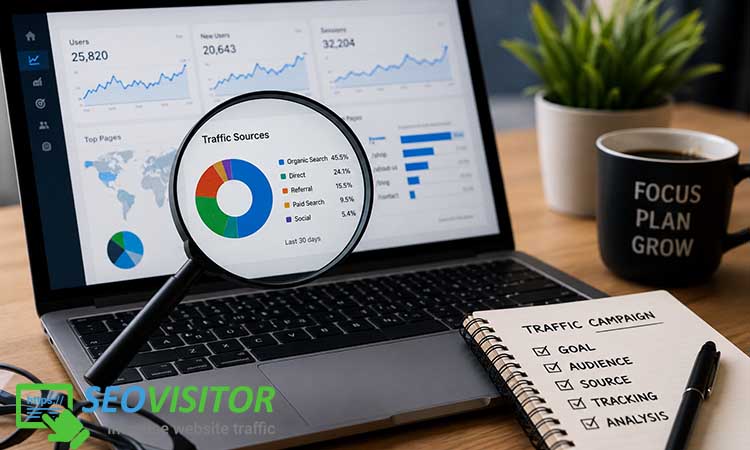
How to Measure Traffic Quality After Buying Website Traffic
Once the campaign starts, your job is to inspect the data.
Check Source and Medium in GA4
Open your GA4 traffic acquisition reports and confirm that the traffic is appearing under the expected source and medium. This is why UTM parameters are so important. Without clean tagging, your campaign may appear as direct traffic, referral traffic, or an unclear source.
Analyze Engagement Rate
Engagement rate helps you understand whether users are doing anything meaningful after they land. A poor engagement rate may suggest irrelevant traffic, misleading placements, slow page speed, or weak landing page messaging.
Compare the campaign against your normal traffic sources. If organic users engage for two minutes and purchased traffic engages for three seconds, there is a quality problem.
Track Conversions, Not Just Visitors
Conversions are the strongest measure of campaign value. A conversion may be a sale, lead, signup, call, download, add-to-cart, affiliate click, or another important action.
Before buying traffic, set up conversion events. After the campaign, compare the cost against the number and quality of conversions.
Look for Suspicious Patterns
Watch for patterns such as identical session durations, unexpected countries, no scrolling, no clicks, sudden spikes, strange referral domains, or traffic that arrives at unnatural hours. One signal alone may not prove fake traffic, but multiple suspicious signs should make you stop and investigate.
Best Types of Website Traffic to Buy Depending on Your Goal
Different goals require different traffic strategies.
For Brand Awareness
Use broader but still relevant traffic sources. Focus on visibility, engaged sessions, returning visitors, and retargeting potential. Do not expect every awareness visitor to buy immediately.
For Ecommerce
Prioritize buyer intent, country targeting, device targeting, and product-page relevance. Track add-to-cart, checkout, purchases, and revenue per visitor. Make sure your shipping, pricing, and trust elements match the target country.
For Affiliate Websites
Focus on niche-relevant traffic. Track outbound affiliate clicks, scroll depth, page engagement, and earnings per click. Avoid traffic that only inflates pageviews without reading the content.
For AdSense or Content Sites
Prioritize safe, real, non-incentivized traffic. Monitor invalid traffic risks and avoid suspicious sources. Content sites should focus on engaged readers, not artificial ad impressions.
For New Websites
Start small. Use traffic to test your pages, headlines, offers, site speed, and audience response. Do not expect purchased traffic to replace long-term SEO.
Common Mistakes People Make When Buying Website Traffic
Most bad traffic campaigns fail for predictable reasons.
Buying Traffic Without Tracking
Without UTM tags, GA4 events, conversion goals, and landing page segmentation, you cannot evaluate quality. You are simply buying numbers.
Sending Traffic to a Weak Landing Page
Even good traffic will fail on a poor landing page. Fix slow loading speed, unclear headlines, weak calls-to-action, confusing design, and poor mobile usability before buying traffic.
Choosing Quantity Over Relevance
Large traffic numbers are meaningless if the audience does not care. A smaller group of relevant visitors is usually more valuable than a large group of random visitors.
Scaling Too Quickly
A small test protects your budget. Scaling too fast can waste money before you understand traffic quality.
Ignoring Post-Campaign Analysis
After each campaign, review the data. Keep what worked, remove what failed, and improve the next test.
Smart Internal and External Linking Recommendations
Use internal links to connect this article with related educational content. Good internal link targets include:
How to increase website traffic
Paid traffic vs organic traffic
How to detect bot traffic in GA4
Why website traffic is not converting
Website traffic quality metrics
How to improve landing page conversion rate
Use external links to support factual or policy-related claims. Good external link targets include:
Google Analytics documentation about traffic acquisition reports
Google Analytics documentation about UTM campaign tracking
Google AdSense documentation about invalid traffic
Google Search Central guidance about helpful, people-first content
Avoid linking to direct competitors that sell the same traffic service. Use external links only when they add credibility, explain a technical process, or support an important safety claim.
On-Page SEO Recommendations for This Article
Use the primary keyword in the title, introduction, at least one H2 or H3, and conclusion. Include related keywords naturally, such as buying website traffic, real website traffic, bot traffic, traffic quality, targeted website visitors, GA4 tracking, UTM tracking, invalid traffic, and website traffic quality metrics.
Keep paragraphs short for mobile readability. Add a table of contents near the top. Use FAQ schema for the questions below. Add original visuals, such as a downloadable checklist, GA4 screenshot, traffic quality scorecard, or comparison table.
Conclusion: Use This Checklist Before Buying Website Traffic
Buying website traffic is not automatically good or bad. It depends on the source, targeting, tracking, quality, and purpose of the campaign. A smart campaign can help you test landing pages, reach new audiences, validate offers, and collect useful data. A poor campaign can waste money, pollute analytics, and create unnecessary risk.
Before spending anything, use this checklist before buying website traffic: define your goal, understand your audience, verify the traffic source, check targeting options, set up GA4 tracking, monitor engagement, protect ad-monetized pages, start small, and judge success by real outcomes instead of raw visitor numbers.
Your next step is simple: do not buy a large traffic package blindly. Start with a controlled test, track every visit properly, and scale only when the data proves that the traffic is real, relevant, and valuable.Before you buy usa traffic, audit your landing page, prepare your UTM tracking, and use this checklist to evaluate the provider. If you have already bought traffic before, review your GA4 reports and identify whether those visitors actually helped your site grow.
Frequently Asked Questions
What should I check before buying website traffic?
Check the traffic source, audience targeting, location targeting, device targeting, delivery speed, provider reputation, tracking options, and conversion potential. Most importantly, make sure the traffic matches your business goal.
Is buying website traffic safe?
Buying website traffic can be safe when visitors are real, relevant, trackable, and sourced transparently. It becomes risky when the traffic is fake, automated, incentivized, misleading, or unsuitable for your website.
Can buying website traffic hurt SEO?
Buying traffic does not directly guarantee better rankings. SEO depends on content quality, relevance, technical performance, links, user satisfaction, and search intent. Low-quality traffic can distort analytics and lead to poor marketing decisions, but traffic alone is not a reliable SEO strategy.
Lasted Comments (0)