

Great job! I was happy using Seovisitor on a few pages, and the results were noticeable. The traffic looked natural and helped improve engagement.

Daniel BrooksSEO Consultant
Increase traffic through your existing backlinks.
Send visits through links already published on other websites. Backlinks traffic campaign starts on the source page and follows your link to its destination, giving existing articles and placements a defined role in your traffic plan.
Customize daily volume, countries, devices, visit duration, and internal pageviews with Advanced settings. Follow campaign progress in Seovisitor and track recorded arrivals in GA4.
 Start Your Traffic Campaign
Sign up with Google and receive a $1 account bonus plus 500 Club Points.
Starting at just $0.08 per 100 visits






Estimate the daily cost of an Advanced campaign using your selected volume, visit duration, and additional page settings.
Configure your campaign with the following options:
Put your published links to work as traffic entry points
An existing backlink gives your website an entry point from another page. Seovisitor lets you build a traffic campaign around that published link, with visits beginning on the source page before continuing to your website.
Use a guest post, sponsored article, or another supported placement that already links to your destination. Choose the link you want to use and plan the campaign around its purpose, whether it leads to a service, product, or piece of content.
Seovisitor’s Buy Backlinks Traffic service is designed for website owners, SEO professionals, and businesses that want to transform their backlinks into real traffic sources, engagement signals, and SEO growth drivers.
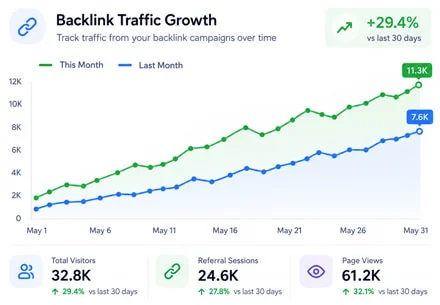
Backlinks traffic consists of visits that follow a link from another website to yours. The backlinks are the published connection between the two pages; the traffic is the activity generated when that connection is used.
Your campaign has two important URLs: the source page that contains the link and the destination page it opens. For example, the source could be a published product review, while the destination is the product page linked within that review.
If your goal is to configure referral sources without choosing this existing-link path, compare the Referral Traffic service. Choose according to the campaign route you need, not just the source name you want to see in a report.
Start with the full URL of the published page containing your backlinks and identify the destination linked from it. In Seovisitor, select the backlinks traffic service and configure the source and destination details required by the order form.
Set the available volume, targeting, visit, and scheduling options. The campaign follows the selected route from the source page through the existing link, with subsequent activity governed by the supported campaign settings.
Begin with a small order to confirm that the source page opens, the intended link can be followed, and arrivals are recorded on your website. Check the route before committing to a longer campaign.
Choose a published page with a working link to your intended destination. Use the article or listing URL that actually contains the link, rather than the publisher’s homepage. Both ends of the route should be accessible for the selected campaign.
Pages behind a login, paywall, or access challenge, and links that depend on unusual scripts or intermediate pages, need compatibility checks before ordering. An ordinary browser click is a useful first check, but it does not establish support for every campaign setup.
Keep the source page and destination available throughout the campaign. If the publisher removes the link or changes its target, the original route no longer matches the order and should be checked with support.
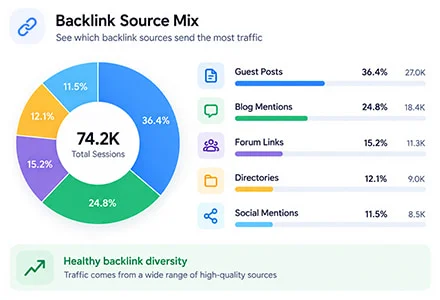
Turn your backlinks into real traffic sources and SEO growth engines with these advanced features in Seovisitor:
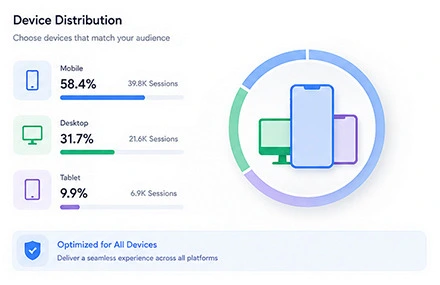
Before starting backlinks traffic campaign, confirm that every source URL is publicly accessible and contains a working link to the correct destination page. The surrounding content, anchor context and landing page should cover a related topic so the complete click path remains relevant.
Choose mobile or desktop traffic according to the layout of both the source page and destination website. If a backlink is difficult to locate or open on a smaller screen, test the mobile experience first. Use existing device data instead of applying one device split to every backlink.
In GA4, backlink-driven sessions can be analyzed through Traffic acquisition using Session source / medium. The referring domain may appear as example.com / referral, while the landing-page dimension identifies where visitors entered your website after clicking the backlink.
Compare engaged sessions, average engagement time, events per session and key events for each referring domain. These measurements help assess the source-to-destination journey without treating higher click volume as proof of conversions, stronger link authority or improved search rankings.
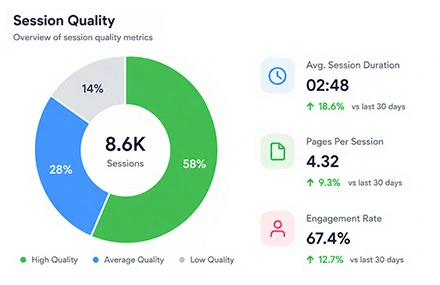
Use several relevant source pages instead of concentrating every visit on a single backlink. Set daily volume according to your existing traffic profile, the visibility of each link and the capacity of the destination page, then scale the campaign gradually when the recorded data supports it.
After launch, track backlinks traffic in Google Analytics and the Seovisitor dashboard. Compare each referring domain separately, then adjust the source URLs, device share, session settings and landing pages using measured user behavior rather than repeating the same configuration across every campaign.
Delivering real visitors from selected GEOs and regions
Explore our dedicated pages for popular GEO-targeted traffic locations:
View traffic by countryTrusted by 20,000+ users, processing over 400,000 orders
Real experiences from marketers, creators and website owners using Seovisitor.
Great job! I was happy using Seovisitor on a few pages, and the results were noticeable. The traffic looked natural and helped improve engagement.
I didn’t expect much at first, but after a few days I noticed better time on page. I mainly use it when launching new content.

I tried Seovisitor on a side project. The traffic increase was subtle but noticeable, and it gave me useful insights for testing new content layouts.

Seovisitor works well for older articles that have stopped getting attention, helping bring them back into circulation.

I’ve used the system several times and noticed an immediate change in my website stats.

This system was used for several blog posts and helped turn one article into one of the most visited. That was amazing.

I don’t run it all the time, only for specific campaigns. For controlled testing, it does the job well.
I applied Seovisitor to a few product pages. It helped me observe user patterns and refine my marketing strategy.
Using Seovisitor for my tech blog posts gave me a better sense of which topics readers engage with most. Very insightful.

Monitor incoming visits and view real-time campaign updates from your Seovisitor dashboard.

Open the Traffic acquisition report and select Session Acquisition → Source/Medium to examine recorded referring domains. Compare sessions, engagement, and key events for the campaign dates, then use landing-page reports to check the destination URLs.
Your website’s analytics does not automatically record browsing activity on the publisher’s website. It also may not identify the exact article containing the clicked link, particularly when several source pages share the same domain.
Use campaign records alongside GA4 and available Clarity recordings to assess arrivals and subsequent activity. Differences in consent, tracking, redirects, and collection methods can cause counts to vary between systems.
Record the full source URL, linked destination, and campaign dates for each placement. If you need article-level attribution, use a suitable campaign identifier where the publisher and campaign setup permit it; a referring domain alone cannot distinguish every link on that website.
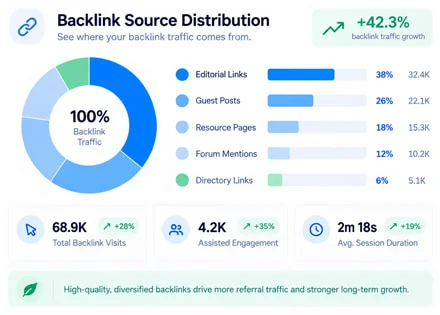
Backlinks traffic campaigns are relevant when you already have an external placement with a usable link. The starting point is the published page, whether it is a guest article, sponsored feature, or another supported listing.
For a sponsored article about a service, use the existing link to the corresponding service page. For a product review or comparison, use the product destination already linked by the publisher. A resource listing can similarly connect a published entry to its referenced guide or tool.
Keep campaign-generated visits separate from the publisher’s ordinary audience traffic when evaluating a placement. Additional paid activity does not establish how much independent reader interest the publication would generate on its own.
A backlink and a visit through that backlink are different measurements. Adding campaign visits does not create another referring domain, change the link’s attributes, or guarantee an increase in its ranking value.
Use the service to increase traffic from existing backlinks with a defined campaign scope. Assess organic search performance separately in Search Console, alongside content, technical SEO, and changes to your actual backlink profile.
Link quality and publication practices still matter. Sponsored placements should retain appropriate link attributes, and campaign activity should not be presented as proof of earned popularity, improved rankings, or customer demand.
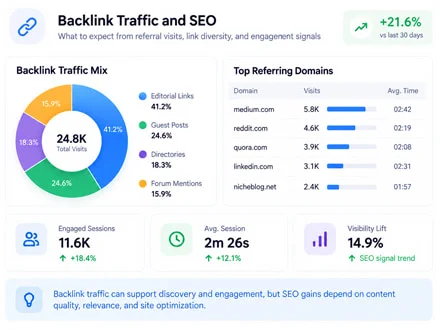
Check the published link, destination page, and tracking setup before placing your order.
Open the exact source page and confirm that its link reaches the intended destination. Note any login requirements, access restrictions, or intermediate redirects before ordering.
Make sure your page loads correctly on the selected device and your hosting can handle the planned activity. Check internal links and resolve errors that could interrupt subsequent browsing.
Check that analytics is active on the destination and relevant internal pages. Keep the source URL and campaign dates available so you can compare the order with recorded arrivals.
Quick answers to the most common questions about buy backlinks traffic
You are ordering traffic through an existing published link. The service does not include creating a new backlink, writing an article, or purchasing a placement on another website.
Use the full URL of the page containing your backlink. The destination is the page that link opens on your website. A publisher’s homepage is only the correct source if the intended link is actually on that page.
Yes, provided the published page and its link are supported by the campaign setup. Check accessibility and the linked destination first, especially if the publisher uses a paywall, access challenge, or intermediate redirect.
No. Attributes such as nofollow and sponsored describe the link relationship for search engines; they do not disable ordinary browser navigation. Campaign compatibility still depends on the page and link implementation.
Identify the intended destination and confirm how the campaign selects the link. If several links lead to different pages, contact support before ordering rather than assuming that every link will receive visits.
Not always. The recorded source may identify only the domain, and referrer policies or redirects can limit the information available. Keep the full source URL in your campaign records when comparing placements.
The original visit route may no longer work. Contact support with the campaign ID and updated source details so the order can be assessed. Do not assume that the campaign automatically switches to another link.
Neither outcome is guaranteed. Campaign visits do not create new backlinks or require search engines to index a page. Evaluate the traffic campaign separately from changes in organic search performance.
The on-page calculator displays an estimated daily cost for the selected inputs. Check the campaign duration and final order amount in your account before confirming the purchase.
Check the source link, destination tracking, report dates, and redirects. If the discrepancy remains, send support your campaign ID and relevant reports. Any adjustment or refund depends on the applicable order terms.
Practical guides, fresh ideas and proven strategies to help you grow smarter.
 All About Site Traffic
Decide whether a USA-targeted traffic campaign pays for itself. Calculate ROI from contribution margin and full cost, review a hypothetical test, and set stop-or-continue rules.
 All About Site Traffic
Understand how AI Overviews can change search presentation and clicks, then compare relevant Query × Page data with the current Generative AI visibility reports without assuming causation.
 Digital Marketing Learning
Plan a shareable campaign around audience value, small tests, a useful landing page, and separate measurement of paid reach, earned referrals, and conversions.